Gallery
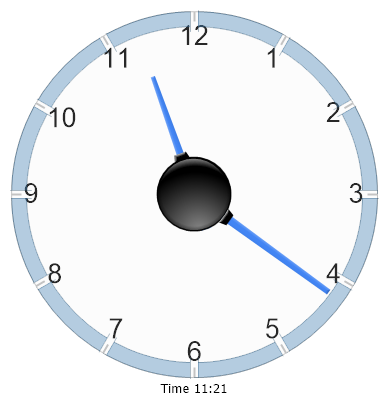
Gauge Clock
<%@ Page Language="C#" Description="dotnetCHARTING Component" %>
<%@ Register TagPrefix="dotnet" Namespace="dotnetCHARTING" Assembly="dotnetCHARTING"%>
<%@ Import Namespace="System.Drawing" %>
<html xmlns="http://www.w3.org/1999/xhtml">
<head>
<title>.netCHARTING Sample</title>
<script runat="server">
void Page_Load(Object sender,EventArgs e)
{
Chart.Type = ChartType.Gauges;//Horizontal;
Chart.Width = 600;
Chart.Height = 400;
Chart.TempDirectory = "temp";
Chart.Debug = true;
Chart.ShadingEffect = true;
Chart.ShadingEffectMode = ShadingEffectMode.One;
// Set the legend box and chart area colors to empty.
Chart.LegendBox.Position = LegendBoxPosition.None;
Chart.ChartArea.ClearColors();
// Add a marker to the y axis to show the range of vales not trimmed from the second series.
Chart.YAxis.Markers.Add(new AxisMarker("",new Background(Color.FromArgb(100,Color.SteelBlue)),0,12));
Chart.YAxis.DefaultTick.Label.Font = new Font("Arial", 20);
Chart.YAxis.FormatString = "d";
// Create a series
Series s = new Series("Time " + DateTime.Now.ToString("%h:mm"));
Element hourElement = new Element();
hourElement.Name= "Hour";
hourElement.YValue = (Convert.ToDouble(DateTime.Now.Hour) + (DateTime.Now.Minute/60.00))%12;
hourElement.Length = 60;
s.Elements.Add(hourElement);
Element minutesElement = new Element("Minutes",(DateTime.Now.Minute/5.00));
s.Elements.Add(minutesElement);
Axis a = Chart.YAxis;
a.OrientationAngle = 0;
a.SweepAngle = 360;
a.Minimum = 0;
a.Maximum = 12;
a.Interval = 1;
// Because 0 and 12 are in the same position we'll clear the '0' label.
a.LabelOverrides.Add(new LabelOverride("0",""));
// Add the random data.
Chart.SeriesCollection.Add(s);
}
</script>
</head>
<body>
<div style="text-align:center">
<dotnet:Chart id="Chart" runat="server" Width="568px" Height="344px">
</dotnet:Chart>
</div>
</body>
</html>
<%@ Page Language="vb" Description="dotnetCHARTING Component" %>
<%@ Register TagPrefix="dotnet" Namespace="dotnetCHARTING" Assembly="dotnetCHARTING"%>
<%@ Import Namespace="System.Drawing" %>
<html xmlns="http://www.w3.org/1999/xhtml">
<head>
<title>.netCHARTING Sample</title>
<script runat="server">
Sub Page_Load(ByVal sender As Object, ByVal e As EventArgs)
Chart.Type = ChartType.Gauges 'Horizontal;
Chart.Width = 600
Chart.Height = 400
Chart.TempDirectory = "temp"
Chart.Debug = True
Chart.ShadingEffect = True
Chart.ShadingEffectMode = ShadingEffectMode.One
' Set the legend box and chart area colors to empty.
Chart.LegendBox.Position = LegendBoxPosition.None
Chart.ChartArea.ClearColors()
' Add a marker to the y axis to show the range of vales not trimmed from the second series.
Chart.YAxis.Markers.Add(New AxisMarker("",New Background(Color.FromArgb(100,Color.SteelBlue)),0,12))
Chart.YAxis.DefaultTick.Label.Font = New Font("Arial", 20)
Chart.YAxis.FormatString = "d"
' Create a series
Dim s As Series = New Series("Time " & DateTime.Now.ToString("%h:mm"))
Dim hourElement As Element = New Element()
hourElement.Name= "Hour"
hourElement.YValue = (Convert.ToDouble(DateTime.Now.Hour) + (DateTime.Now.Minute/60.00)) Mod 12
hourElement.Length = 60
s.Elements.Add(hourElement)
Dim minutesElement As Element = New Element("Minutes",(DateTime.Now.Minute/5.00))
s.Elements.Add(minutesElement)
Dim a As Axis = Chart.YAxis
a.OrientationAngle = 0
a.SweepAngle = 360
a.Minimum = 0
a.Maximum = 12
a.Interval = 1
' Because 0 and 12 are in the same position we'll clear the '0' label.
a.LabelOverrides.Add(New LabelOverride("0",""))
' Add the random data.
Chart.SeriesCollection.Add(s)
End Sub
</script>
</head>
<body>
<div style="text-align:center">
<dotnet:Chart id="Chart" runat="server" Width="568px" Height="344px">
</dotnet:Chart>
</div>
</body>
</html>
- Sample FilenameGaugeClock.aspx
- VersionLegacy (Pre 3.0)
- Uses DatabaseNo