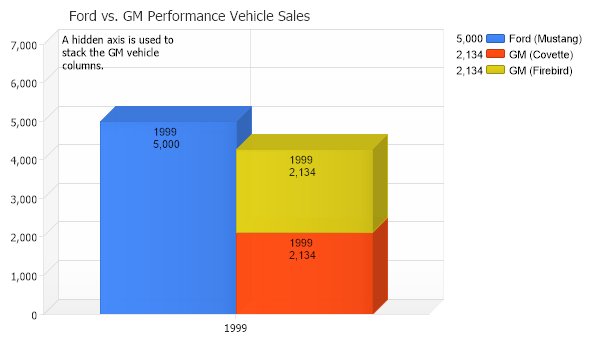
Chart.Type = ChartType.Combo; Chart.Width = 600; Chart.Height = 350; Chart.TempDirectory = "temp"; Chart.Use3D = true; Chart.Debug = true; Chart.Title = "Ford vs. GM Performance Vehicle Sales"; Chart.DefaultSeries.DefaultElement.ShowValue = true; Chart.DefaultSeries.DefaultElement.SmartLabel.Text = "%Name \n%YValue"; Chart.ChartArea.Label.Text = "A hidden axis is used to\nstack the GM vehicle \ncolumns.";
// Demonstrates how to use a second y axis to show a different scale.
// *STATIC DATA NOTE* // This sample uses static data to populate the chart. To populate // a chart with database data see the following resources: // - Classic samples folder // - Help File > Data Tutorials // - Sample: features/DataEngine.aspx
// The Ford series and element Series fs = new Series("Ford (Mustang)"); fs.Elements.Add(new Element("1999",5000));
// Two GM Series. Series gms = new Series("GM (Covette)"); Series gms2 = new Series("GM (Firebird)"); gms.Elements.Add(new Element("1999",2134)); gms2.Elements.Add(new Element("1999",2134));
// In order for the gm series to be stacked we need a new axis with a stacked scale. gms.YAxis = new Axis(); gms.YAxis.Scale = Scale.Stacked;
// Use the same axis for both series. gms2.YAxis = gms.YAxis;
// Ensure scales match gms.YAxis.Maximum = 7000; Chart.YAxis.Maximum = 7000;
// Make the new axis invisible. gms.YAxis.Clear();
// Add the data. Chart.SeriesCollection.Add(fs); Chart.SeriesCollection.Add(gms); Chart.SeriesCollection.Add(gms2);
' Demonstrates how to use a second y axis to show a different scale.
' *STATIC DATA NOTE* ' This sample uses static data to populate the chart. To populate ' a chart with database data see the following resources: ' - Classic samples folder ' - Help File > Data Tutorials ' - Sample: features/DataEngine.aspx
' The Ford series and element Dim fs As Series = New Series("Ford (Mustang)") fs.Elements.Add(New Element("1999",5000))
' Two GM Series. Dim gms As Series = New Series("GM (Covette)") Dim gms2 As Series = New Series("GM (Firebird)") gms.Elements.Add(New Element("1999",2134)) gms2.Elements.Add(New Element("1999",2134))
' In order for the gm series to be stacked we need a new axis with a stacked scale. gms.YAxis = New Axis() gms.YAxis.Scale = Scale.Stacked
' Use the same axis for both series. gms2.YAxis = gms.YAxis
' Ensure scales match gms.YAxis.Maximum = 7000 Chart.YAxis.Maximum = 7000
' Make the new axis invisible. gms.YAxis.Clear()
' Add the data. Chart.SeriesCollection.Add(fs) Chart.SeriesCollection.Add(gms) Chart.SeriesCollection.Add(gms2)

 Previous