Gallery
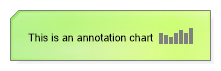
Annotation Chart
<%@ Page Language="C#" Description="dotnetCHARTING Component" %>
<%@ Register TagPrefix="dnc" Namespace="dotnetCHARTING" Assembly="dotnetCHARTING" %>
<%@ Import Namespace="System.Drawing" %>
<script runat="server">
void Page_Load(Object sender, EventArgs e)
{
// Demonstrates creating a chart that draws only an annotation.
Chart.TempDirectory = "temp";
Chart.Debug = true;
Chart.Size = "200x50";
// Create the annotation.
Annotation an = new Annotation("This is an annotation chart <Chart:Column values='5,4,3,5,6,5,7'>");
an.DynamicSize = false;
an.Size = new Size(200, 50);
an.Background.Color = Color.GreenYellow;
an.Background.ShadingEffectMode = ShadingEffectMode.Background2;
// Use the annotation to create the chart.
Chart.ObjectChart = an;
}
</script>
<html xmlns="http://www.w3.org/1999/xhtml">
<head>
<title>.netCHARTING Sample</title>
</head>
<body>
<div align="center">
<dnc:Chart ID="Chart" runat="server" />
</div>
</body>
</html>
<%@ Page Language="vb" Description="dotnetCHARTING Component" %>
<%@ Register TagPrefix="dnc" Namespace="dotnetCHARTING" Assembly="dotnetCHARTING" %>
<%@ Import Namespace="System.Drawing" %>
<script runat="server">
Sub Page_Load(ByVal sender As Object, ByVal e As EventArgs)
' Demonstrates creating a chart that draws only an annotation.
Chart.TempDirectory = "temp"
Chart.Debug = True
Chart.Size = "200x50"
' Create the annotation.
Dim an As Annotation = New Annotation("This is an annotation chart <Chart:Column values='5,4,3,5,6,5,7'>")
an.DynamicSize = False
an.Size = New Size(200, 50)
an.Background.Color = Color.GreenYellow
an.Background.ShadingEffectMode = ShadingEffectMode.Background2
' Use the annotation to create the chart.
Chart.ObjectChart = an
End Sub
</script>
<html xmlns="http://www.w3.org/1999/xhtml">
<head>
<title>.netCHARTING Sample</title>
</head>
<body>
<div align="center">
<dnc:Chart ID="Chart" runat="server" />
</div>
</body>
</html>
- Sample FilenameAnnotationChart.aspx
- Version5.3
- Uses DatabaseNo