Gallery

 Previous
Styled Clean
<%@ Page Language="C#" Description="dotnetCHARTING Component" %>
<%@ Register TagPrefix="dnc" Namespace="dotnetCHARTING" Assembly="dotnetCHARTING" %>
<%@ Import Namespace="System.Drawing" %>
<script runat="server">
void Page_Load(Object sender, EventArgs e)
{
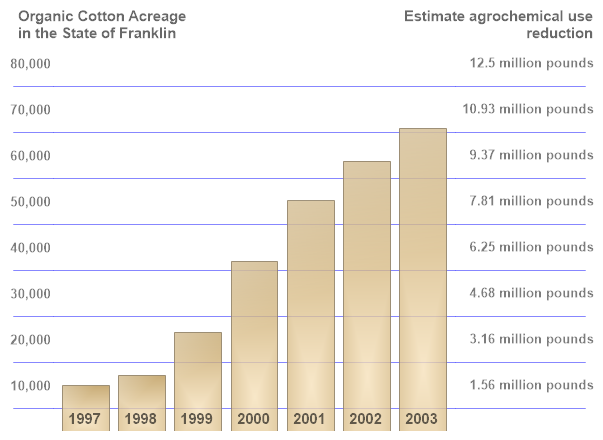
// Demonstrates advanced styling to create a different chart look.
Chart.Size = "600x450";
Chart.TempDirectory = "temp";
//Chart.Background.Color = Color.FromArgb(20,Color.SkyBlue);
Chart.MarginTop = 60;
Chart.Debug = true;
Chart.Palette = new Color[] { Color.Wheat};
Chart.ShadingEffectMode = ShadingEffectMode.One;
Chart.LegendBox.Visible = false;
Chart.DefaultElement.Transparency = 20;
Chart.DefaultElement.ShowValue = true;
Chart.DefaultElement.SmartLabel.Alignment = LabelAlignment.Bottom;
Chart.DefaultElement.SmartLabel.Font = new Font("Arial", 11, FontStyle.Bold);
Chart.DefaultElement.SmartLabel.Text = "%Name<row><Chart:Spacer size='1x2'>";
Chart.DefaultElement.SmartLabel.Color =Color.FromArgb(150, Color.Black);
Chart.ChartArea.ClearColors();
Chart.YAxis.DefaultTick.Label.Color = Color.FromArgb(130, Color.Black);
Chart.YAxis.DefaultTick.Line.Length = 40;
Chart.YAxis.DefaultTick.Line.Width = 1;
Chart.YAxis.DefaultTick.Line.Color = Color.FromArgb(120, Color.Blue);
Chart.YAxis.DefaultTick.GridLine.Color =Color.Transparent;
Chart.YAxis.CenterTickMarks = false;
Chart.YAxis.Line.Color = Color.Transparent;
Chart.XAxis.ClearValues = true;
Chart.XAxis.Line.Color = Color.Transparent;
Chart.DefaultAxis.DefaultTick.Label.Font = new Font("Arial", 10, FontStyle.Bold);
Axis y2 = Chart.YAxis.Calculate("");
y2.Orientation = dotnetCHARTING.Orientation.Right;
y2.CenterTickMarks = false;
y2.DefaultTick.Line.Length = 130;
y2.DefaultTick.Label.Color = Color.FromArgb(130, Color.Black);
y2.DefaultTick.GridLine.Color = Color.FromArgb(120, Color.Blue);
y2.DefaultTick.Line.Color = Color.FromArgb(120, Color.Blue);
y2.Line.Color = Color.Transparent;
Chart.AxisCollection.Add(y2);
y2.DefaultTick.Label.Font = new Font("Arial", 10, FontStyle.Bold);
y2.ExtraTicks.Add(new AxisTick(10000, "1.56 million pounds"));
y2.ExtraTicks.Add(new AxisTick(20000, "3.16 million pounds"));
y2.ExtraTicks.Add(new AxisTick(30000, "4.68 million pounds"));
y2.ExtraTicks.Add(new AxisTick(40000, "6.25 million pounds"));
y2.ExtraTicks.Add(new AxisTick(50000, "7.81 million pounds"));
y2.ExtraTicks.Add(new AxisTick(60000, "9.37 million pounds"));
y2.ExtraTicks.Add(new AxisTick(70000, "10.93 million pounds"));
y2.ExtraTicks.Add(new AxisTick(80000, "12.5 million pounds"));
y2.ExtraTicks.Add(new AxisTick(0," "));
Chart.YAxis.ExtraTicks.Add(new AxisTick(0, " "));
foreach (AxisTick at in y2.ExtraTicks)
{
at.Label.Text = "<block hAlign='Right'>" + at.Label.Text;
}
Annotation an = new Annotation("Organic Cotton Acreage \nin the State of Franklin");
an.ClearColors();
an.Position = new Point(10, 5);
an.Label.Font = new Font("Arial", 11, FontStyle.Bold);
an.DynamicSize = false;
an.Label.Alignment = StringAlignment.Near;
an.Label.Color = Color.FromArgb(150,Color.Black);
Chart.Annotations.Add(an);
Annotation an2 = new Annotation("Estimate agrochemical use \nreduction");
an2.ClearColors();
an2.Position = new Point(390, 5);
an2.Label.Font = new Font("Arial", 11, FontStyle.Bold);
an2.DynamicSize = false;
an2.Label.Alignment = StringAlignment.Far;
an2.Label.Color = Color.FromArgb(150,Color.Black);
Chart.Annotations.Add(an2);
// *DYNAMIC DATA NOTE*
// This sample uses random data to populate the chart. To populate
// a chart with database data see the following resources:
// - Use the getLiveData() method using the dataEngine to query a database.
// - Help File > Getting Started > Data Tutorials
// - DataEngine Class in the help file
// - Sample: features/DataEngine.aspx
SeriesCollection mySC = getRandomData();
// Add the random data.
Chart.SeriesCollection.Add(mySC);
}
SeriesCollection getRandomData()
{
Random myR = new Random(1);
int stY = 1997;
int startV = 5000;
SeriesCollection SC = new SeriesCollection();
for (int a = 1; a < 2; a++)
{
Series s = new Series("Series " + a.ToString());
for (int b = 1; b < 8; b++)
{
Element e = new Element((stY++).ToString());
e.YValue = startV + myR.Next(20000);
startV = (int)e.YValue;
e.XValue = b;
s.Elements.Add(e);
}
SC.Add(s);
}
return SC;
}
SeriesCollection getLiveData()
{
DataEngine de = new DataEngine(ConfigurationManager.AppSettings["DNCConnectionString"]);
de.ChartObject = Chart; // Necessary to view any errors the dataEngine may throw.
de.SqlStatement = "SELECT XAxisColumn, YAxisColumn FROM ....";
return de.GetSeries();
}
</script>
<html xmlns="http://www.w3.org/1999/xhtml">
<head>
<title>.netCHARTING Sample</title>
</head>
<style type="text/css">
div, p
{
font-family: Arial, Helvetica, sans-serif;
font-size: x-small;
}
</style>
<body>
<div align="center">
<dnc:Chart ID="Chart" runat="server" />
</div>
</body>
</html>
<%@ Page Language="vb" Description="dotnetCHARTING Component" %>
<%@ Register TagPrefix="dnc" Namespace="dotnetCHARTING" Assembly="dotnetCHARTING" %>
<%@ Import Namespace="System.Drawing" %>
<script runat="server">
Sub Page_Load(ByVal sender As Object, ByVal e As EventArgs)
' Demonstrates advanced styling to create a different chart look.
Chart.Size = "600x450"
Chart.TempDirectory = "temp"
'Chart.Background.Color = Color.FromArgb(20,Color.SkyBlue);
Chart.MarginTop = 60
Chart.Debug = True
Chart.Palette = New Color() { Color.Wheat}
Chart.ShadingEffectMode = ShadingEffectMode.One
Chart.LegendBox.Visible = False
Chart.DefaultElement.Transparency = 20
Chart.DefaultElement.ShowValue = True
Chart.DefaultElement.SmartLabel.Alignment = LabelAlignment.Bottom
Chart.DefaultElement.SmartLabel.Font = New Font("Arial", 11, FontStyle.Bold)
Chart.DefaultElement.SmartLabel.Text = "%Name<row><Chart:Spacer size='1x2'>"
Chart.DefaultElement.SmartLabel.Color =Color.FromArgb(150, Color.Black)
Chart.ChartArea.ClearColors()
Chart.YAxis.DefaultTick.Label.Color = Color.FromArgb(130, Color.Black)
Chart.YAxis.DefaultTick.Line.Length = 40
Chart.YAxis.DefaultTick.Line.Width = 1
Chart.YAxis.DefaultTick.Line.Color = Color.FromArgb(120, Color.Blue)
Chart.YAxis.DefaultTick.GridLine.Color =Color.Transparent
Chart.YAxis.CenterTickMarks = False
Chart.YAxis.Line.Color = Color.Transparent
Chart.XAxis.ClearValues = True
Chart.XAxis.Line.Color = Color.Transparent
Chart.DefaultAxis.DefaultTick.Label.Font = New Font("Arial", 10, FontStyle.Bold)
Dim y2 As Axis = Chart.YAxis.Calculate("")
y2.Orientation = dotnetCHARTING.Orientation.Right
y2.CenterTickMarks = False
y2.DefaultTick.Line.Length = 130
y2.DefaultTick.Label.Color = Color.FromArgb(130, Color.Black)
y2.DefaultTick.GridLine.Color = Color.FromArgb(120, Color.Blue)
y2.DefaultTick.Line.Color = Color.FromArgb(120, Color.Blue)
y2.Line.Color = Color.Transparent
Chart.AxisCollection.Add(y2)
y2.DefaultTick.Label.Font = New Font("Arial", 10, FontStyle.Bold)
y2.ExtraTicks.Add(New AxisTick(10000, "1.56 million pounds"))
y2.ExtraTicks.Add(New AxisTick(20000, "3.16 million pounds"))
y2.ExtraTicks.Add(New AxisTick(30000, "4.68 million pounds"))
y2.ExtraTicks.Add(New AxisTick(40000, "6.25 million pounds"))
y2.ExtraTicks.Add(New AxisTick(50000, "7.81 million pounds"))
y2.ExtraTicks.Add(New AxisTick(60000, "9.37 million pounds"))
y2.ExtraTicks.Add(New AxisTick(70000, "10.93 million pounds"))
y2.ExtraTicks.Add(New AxisTick(80000, "12.5 million pounds"))
y2.ExtraTicks.Add(New AxisTick(0," "))
Chart.YAxis.ExtraTicks.Add(New AxisTick(0, " "))
For Each at As AxisTick In y2.ExtraTicks
at.Label.Text = "<block hAlign='Right'>" & at.Label.Text
Next at
Dim an As Annotation = New Annotation("Organic Cotton Acreage " & Constants.vbLf & "in the State of Franklin")
an.ClearColors()
an.Position = New Point(10, 5)
an.Label.Font = New Font("Arial", 11, FontStyle.Bold)
an.DynamicSize = False
an.Label.Alignment = StringAlignment.Near
an.Label.Color = Color.FromArgb(150,Color.Black)
Chart.Annotations.Add(an)
Dim an2 As Annotation = New Annotation("Estimate agrochemical use " & Constants.vbLf & "reduction")
an2.ClearColors()
an2.Position = New Point(390, 5)
an2.Label.Font = New Font("Arial", 11, FontStyle.Bold)
an2.DynamicSize = False
an2.Label.Alignment = StringAlignment.Far
an2.Label.Color = Color.FromArgb(150,Color.Black)
Chart.Annotations.Add(an2)
' *DYNAMIC DATA NOTE*
' This sample uses random data to populate the chart. To populate
' a chart with database data see the following resources:
' - Use the getLiveData() method using the dataEngine to query a database.
' - Help File > Getting Started > Data Tutorials
' - DataEngine Class in the help file
' - Sample: features/DataEngine.aspx
Dim mySC As SeriesCollection = getRandomData()
' Add the random data.
Chart.SeriesCollection.Add(mySC)
End Sub
Function getRandomData() As SeriesCollection
Dim myR As Random = New Random(1)
Dim stY As Integer = 1997
Dim startV As Integer = 5000
Dim SC As SeriesCollection = New SeriesCollection()
For a As Integer = 1 To 1
Dim s As Series = New Series("Series " & a.ToString())
For b As Integer = 1 To 7
Dim e As Element = New Element((stY).ToString())
stY += 1
e.YValue = startV + myR.Next(20000)
startV = CInt(Fix(e.YValue))
e.XValue = b
s.Elements.Add(e)
Next b
SC.Add(s)
Next a
Return SC
End Function
Function getLiveData() As SeriesCollection
Dim de As DataEngine = New DataEngine(ConfigurationManager.AppSettings("DNCConnectionString"))
de.ChartObject = Chart ' Necessary to view any errors the dataEngine may throw.
de.SqlStatement = "SELECT XAxisColumn, YAxisColumn FROM ...."
Return de.GetSeries()
End Function
</script>
<html xmlns="http://www.w3.org/1999/xhtml">
<head>
<title>.netCHARTING Sample</title>
</head>
<style type="text/css">
div, p
{
font-family: Arial, Helvetica, sans-serif;
font-size: x-small;
}
</style>
<body>
<div align="center">
<dnc:Chart ID="Chart" runat="server" />
</div>
</body>
</html>
- Sample FilenameStyledClean.aspx
- Version7.0
- Uses DatabaseNo