Gallery
Stacked Limit Bars
<%@ Page Language="C#" Description="dotnetCHARTING Component" %>
<%@ Register TagPrefix="dnc" Namespace="dotnetCHARTING" Assembly="dotnetCHARTING" %>
<%@ Import Namespace="System.Drawing" %>
<%@ Import Namespace="System.Drawing.Drawing2D" %>
<%@ Import Namespace="dotnetCHARTING.Mapping" %>
<script runat="server">
void Page_Load(Object sender, EventArgs e)
{
// Demonstrates how to overlay a styled line or bar on a stacked bar chart.
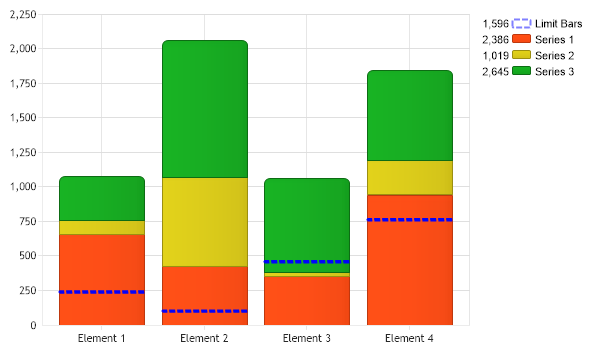
Chart.Type = ChartType.Combo;
Chart.Width = 600;
Chart.Height = 350;
Chart.TempDirectory = "temp";
Chart.Debug = true;
Chart.YAxis.Scale = Scale.Stacked;
SeriesCollection sc = getRandomData(1);
// One of the series (s[0]) will represent the limit lines.
Series s = sc[0];
s.Name = "Limit Bars";
// New axes are assigned so it doesnt get stacked like the other elements.
s.YAxis = new Axis();
s.XAxis = new Axis();
s.YAxis.ClearValues = true;
s.XAxis.ClearValues = true;
// The new axes are syncronized so the data applies to the stacked y axis.
Chart.YAxis.SynchronizeScale.Add(s.YAxis);
// Add the random data.
Chart.SeriesCollection.Add(sc);
// The limit elements are styled and a start value is set so they dont stretch to the floor.
foreach (Element el in s.Elements)
{
el.YValueStart = el.YValue - 10;
el.Outline.Color = Color.Blue;
el.Outline.Width = 2;
el.Outline.DashStyle = System.Drawing.Drawing2D.DashStyle.Dash;
el.Color = Color.Transparent;
}
}
SeriesCollection getRandomData(int seed)
{
SeriesCollection SC = new SeriesCollection();
Random myR = new Random(seed);
for (int a = 0; a < 4; a++)//series 0 name override later
{
Series s = new Series();
s.Name = "Series " + a;
for (int b = 1; b < 5; b++)
{
Element e = new Element();
e.Name = "Element " + b;
e.YValue = myR.Next(1000);
s.Elements.Add(e);
}
SC.Add(s);
}
return SC;
}
</script>
<html xmlns="http://www.w3.org/1999/xhtml">
<head>
<title>.netCHARTING Sample</title>
</head>
<style type="text/css">
div, p
{
font-family: Arial, Helvetica, sans-serif;
font-size: x-small;
}
</style>
<body>
<div align="center">
<dnc:Chart ID="Chart" runat="server" />
</div>
</body>
</html>
<%@ Page Language="vb" Description="dotnetCHARTING Component" %>
<%@ Register TagPrefix="dnc" Namespace="dotnetCHARTING" Assembly="dotnetCHARTING" %>
<%@ Import Namespace="System.Drawing" %>
<%@ Import Namespace="System.Drawing.Drawing2D" %>
<%@ Import Namespace="dotnetCHARTING.Mapping" %>
<script runat="server">
Sub Page_Load(ByVal sender As Object, ByVal e As EventArgs)
' Demonstrates how to overlay a styled line or bar on a stacked bar chart.
Chart.Type = ChartType.Combo
Chart.Width = 600
Chart.Height = 350
Chart.TempDirectory = "temp"
Chart.Debug = True
Chart.YAxis.Scale = Scale.Stacked
Dim sc As SeriesCollection = getRandomData(1)
' One of the series (s[0]) will represent the limit lines.
Dim s As Series = sc(0)
s.Name = "Limit Bars"
' New axes are assigned so it doesnt get stacked like the other elements.
s.YAxis = New Axis()
s.XAxis = New Axis()
s.YAxis.ClearValues = True
s.XAxis.ClearValues = True
' The new axes are syncronized so the data applies to the stacked y axis.
Chart.YAxis.SynchronizeScale.Add(s.YAxis)
' Add the random data.
Chart.SeriesCollection.Add(sc)
' The limit elements are styled and a start value is set so they dont stretch to the floor.
For Each el As Element In s.Elements
el.YValueStart = el.YValue - 10
el.Outline.Color = Color.Blue
el.Outline.Width = 2
el.Outline.DashStyle = System.Drawing.Drawing2D.DashStyle.Dash
el.Color = Color.Transparent
Next el
End Sub
Function getRandomData(ByVal seed As Integer) As SeriesCollection
Dim SC As SeriesCollection = New SeriesCollection()
Dim myR As Random = New Random(seed)
For a As Integer = 0 To 3 'series 0 name override later
Dim s As Series = New Series()
s.Name = "Series " & a
For b As Integer = 1 To 4
Dim e As Element = New Element()
e.Name = "Element " & b
e.YValue = myR.Next(1000)
s.Elements.Add(e)
Next b
SC.Add(s)
Next a
Return SC
End Function
</script>
<html xmlns="http://www.w3.org/1999/xhtml">
<head>
<title>.netCHARTING Sample</title>
</head>
<style type="text/css">
div, p
{
font-family: Arial, Helvetica, sans-serif;
font-size: x-small;
}
</style>
<body>
<div align="center">
<dnc:Chart ID="Chart" runat="server" />
</div>
</body>
</html>
- Sample FilenameStackedLimitBars.aspx
- Version6.2
- Uses DatabaseNo