Org Levels
Demonstrates using the Series.Trim method to figure out the organizational level each node is on.
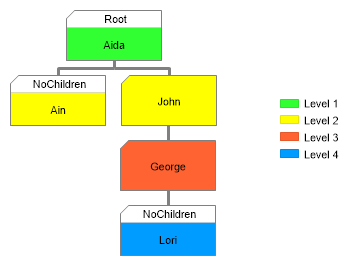
<%@ Page Language="C#" Description="dotnetCHARTING Component" %>
<%@ Register TagPrefix="dnc" Namespace="dotnetCHARTING" Assembly="dotnetCHARTING" %>
<%@ Import Namespace="System.Drawing" %>
<script runat="server">
void Page_Load(Object sender, EventArgs e)
{
// Demonstrates using the Series.Trim method to figure out the organizational level each node is on.
Chart.Size = "400x380";
Chart.TempDirectory = "temp";
Chart.Type = ChartType.Organizational;
Chart.Debug = true;
Chart.Palette = new Color[] { Color.FromArgb(49, 255, 49), Color.FromArgb(255, 255, 0), Color.FromArgb(255, 99, 49), Color.FromArgb(0, 156, 255), Color.FromArgb(0, 156, 255) };
// Set styling defaults.
Chart.ChartArea.ClearColors();
Chart.DefaultSeries.Line.Color = Color.Gray;
Chart.DefaultSeries.Line.Width = 3;
Chart.DefaultSeries.LegendEntry.Visible = false;
// Style the default annotation.
Chart.DefaultElement.Annotation = new Annotation();
Chart.DefaultElement.Annotation.Padding = 5;
Chart.DefaultElement.Annotation.Size = new Size(95, 50);
// Get Data
SeriesCollection mySC = getLiveData();
// Trim the data to get organizational levels and other attributes.
Series result = mySC[0].Trim(20);
foreach (Element el in result.Elements)
{
// Each node takes a color set based on the organizational level.
if (el.CustomAttributes["OrganizationalLevel"] != null)
{
if (el.Annotation == null) el.Annotation = new Annotation();
el.Annotation.Background.Color = Chart.Palette[((int)el.CustomAttributes["OrganizationalLevel"]) - 1];
}
// If the node has a node type attribute, it is placed in the header of the annotation.
if (el.CustomAttributes["NodeType"] != null)
{
if (el.Annotation == null) el.Annotation = new Annotation();
el.Annotation.HeaderLabel.Text = " %NodeType";
}
}
// Create a custom legendbox with an entry for each level.
Chart.LegendBox.Visible = true;
Chart.LegendBox.Position = LegendBoxPosition.Middle;
Chart.LegendBox.Padding = 5;
for (int i = 0; i < 4; i++)
Chart.LegendBox.ExtraEntries.Add(new LegendEntry("Level " + (i + 1), "", Chart.Palette[i]));
// Add the data
Chart.SeriesCollection.Add(result);
}
SeriesCollection getLiveData()
{
// Obtain series data from the database. Note this was created by adding PID (parentid)
// to an existing table only, then populating the parentid based on the hiearchy in place.
DataEngine de = new DataEngine(ConfigurationManager.AppSettings["DNCConnectionString"]);
de.SqlStatement = @"SELECT * FROM Employees";
//Select only some users
de.SqlStatement += " WHERE Name LIKE 'Aida' OR Name LIKE 'Ain' OR Name LIKE 'John' OR Name LIKE 'George' OR Name LIKE 'Lori' ";
de.DataFields = "InstanceID=ID,InstanceParentID=PID,Name=Name,office,Department,Email,Phone,Picture";
return de.GetSeries();
}
</script>
<html xmlns="http://www.w3.org/1999/xhtml">
<head>
<title>.netCHARTING Sample</title>
</head>
<body>
<div align="center">
<dnc:Chart ID="Chart" runat="server" />
</div>
</body>
</html>
<%@ Page Language="vb" Description="dotnetCHARTING Component" %>
<%@ Register TagPrefix="dnc" Namespace="dotnetCHARTING" Assembly="dotnetCHARTING" %>
<%@ Import Namespace="System.Drawing" %>
<script runat="server">
Sub Page_Load(ByVal sender As Object, ByVal e As EventArgs)
' Demonstrates using the Series.Trim method to figure out the organizational level each node is on.
Chart.Size = "400x380"
Chart.TempDirectory = "temp"
Chart.Type = ChartType.Organizational
Chart.Debug = True
Chart.Palette = New Color() { Color.FromArgb(49, 255, 49), Color.FromArgb(255, 255, 0), Color.FromArgb(255, 99, 49), Color.FromArgb(0, 156, 255), Color.FromArgb(0, 156, 255) }
' Set styling defaults.
Chart.ChartArea.ClearColors()
Chart.DefaultSeries.Line.Color = Color.Gray
Chart.DefaultSeries.Line.Width = 3
Chart.DefaultSeries.LegendEntry.Visible = False
' Style the default annotation.
Chart.DefaultElement.Annotation = New Annotation()
Chart.DefaultElement.Annotation.Padding = 5
Chart.DefaultElement.Annotation.Size = New Size(95, 50)
' Get Data
Dim mySC As SeriesCollection = getLiveData()
' Trim the data to get organizational levels and other attributes.
Dim result As Series = mySC(0).Trim(20)
For Each el As Element In result.Elements
' Each node takes a color set based on the organizational level.
If Not el.CustomAttributes("OrganizationalLevel") Is Nothing Then
If el.Annotation Is Nothing Then
el.Annotation = New Annotation()
End If
el.Annotation.Background.Color = Chart.Palette((CInt(Fix(el.CustomAttributes("OrganizationalLevel")))) - 1)
End If
' If the node has a node type attribute, it is placed in the header of the annotation.
If Not el.CustomAttributes("NodeType") Is Nothing Then
If el.Annotation Is Nothing Then
el.Annotation = New Annotation()
End If
el.Annotation.HeaderLabel.Text = " %NodeType"
End If
Next el
' Create a custom legendbox with an entry for each level.
Chart.LegendBox.Visible = True
Chart.LegendBox.Position = LegendBoxPosition.Middle
Chart.LegendBox.Padding = 5
For i As Integer = 0 To 3
Chart.LegendBox.ExtraEntries.Add(New LegendEntry("Level " & (i + 1), "", Chart.Palette(i)))
Next i
' Add the data
Chart.SeriesCollection.Add(result)
End Sub
Function getLiveData() As SeriesCollection
' Obtain series data from the database. Note this was created by adding PID (parentid)
' to an existing table only, then populating the parentid based on the hiearchy in place.
Dim de As DataEngine = New DataEngine(ConfigurationManager.AppSettings("DNCConnectionString"))
de.SqlStatement = "SELECT * FROM Employees"
'Select only some users
de.SqlStatement &= " WHERE Name LIKE 'Aida' OR Name LIKE 'Ain' OR Name LIKE 'John' OR Name LIKE 'George' OR Name LIKE 'Lori' "
de.DataFields = "InstanceID=ID,InstanceParentID=PID,Name=Name,office,Department,Email,Phone,Picture"
Return de.GetSeries()
End Function
</script>
<html xmlns="http://www.w3.org/1999/xhtml">
<head>
<title>.netCHARTING Sample</title>
</head>
<body>
<div align="center">
<dnc:Chart ID="Chart" runat="server" />
</div>
</body>
</html>

 Previous