Gallery
Org DB Simple
<%@ Page Language="C#" Trace="false" Description="dotnetCHARTING Component" %>
<%@ Register TagPrefix="dotnet" Namespace="dotnetCHARTING" Assembly="dotnetCHARTING" %>
<%@ Import Namespace="System.Drawing" %>
<script runat="server">
void Page_Load(Object sender, EventArgs e)
{
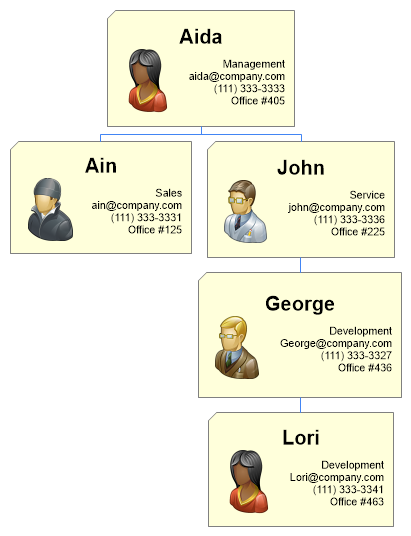
// Demonstrates usage of an organizational chart using custom attributes populated from an existing user table by adding instance and parent IDs to establish the org hierarchy.
// Set global properties
Chart.Type = ChartType.Organizational;
Chart.Size = "500x600";
Chart.TempDirectory = "temp";
Chart.Debug = true;
Chart.DefaultElement.Annotation = new Annotation();
Chart.DefaultElement.Annotation.Padding = 10;
Chart.DefaultElement.Annotation.Label.Text = "<block fStyle='bold' fSize='15'>%name<row><img:../../images/Org%picture><block halign='right'>%Department<br>%Email<br>%phone<br>Office #%office";
// Obtain series data from the database. Note this was created by adding PID (parentid)
// to an existing table only, then populating the parentid based on the hiearchy in place.
DataEngine de = new DataEngine(ConfigurationManager.AppSettings["DNCConnectionString"]);
de.SqlStatement = @"SELECT * FROM Employees";
//Select only some users
de.SqlStatement += " WHERE Name LIKE 'Aida' OR Name LIKE 'Ain' OR Name LIKE 'John' OR Name LIKE 'George' OR Name LIKE 'Lori' ";
de.DataFields = "XAxis=Name,InstanceID=ID,InstanceParentID=PID,Name,office,Department,Email,Phone,Picture";
Chart.SeriesCollection.Add(de.GetSeries());
}
</script>
<html>
<head>
<title>Database Driven Organizational Chart</title>
</head>
<body>
<div style="text-align: center">
<dotnet:Chart ID="Chart" runat="server" />
</div>
</body>
</html>
<%@ Page Language="vb" Trace="false" Description="dotnetCHARTING Component" %>
<%@ Register TagPrefix="dotnet" Namespace="dotnetCHARTING" Assembly="dotnetCHARTING" %>
<%@ Import Namespace="System.Drawing" %>
<script runat="server">
Sub Page_Load(ByVal sender As Object, ByVal e As EventArgs)
' Demonstrates usage of an organizational chart using custom attributes populated from an existing user table by adding instance and parent IDs to establish the org hierarchy.
' Set global properties
Chart.Type = ChartType.Organizational
Chart.Size = "500x600"
Chart.TempDirectory = "temp"
Chart.Debug = True
Chart.DefaultElement.Annotation = New Annotation()
Chart.DefaultElement.Annotation.Padding = 10
Chart.DefaultElement.Annotation.Label.Text = "<block fStyle='bold' fSize='15'>%name<row><img:../../images/Org%picture><block halign='right'>%Department<br>%Email<br>%phone<br>Office #%office"
' Obtain series data from the database. Note this was created by adding PID (parentid)
' to an existing table only, then populating the parentid based on the hiearchy in place.
Dim de As DataEngine = New DataEngine(ConfigurationManager.AppSettings("DNCConnectionString"))
de.SqlStatement = "SELECT * FROM Employees"
'Select only some users
de.SqlStatement &= " WHERE Name LIKE 'Aida' OR Name LIKE 'Ain' OR Name LIKE 'John' OR Name LIKE 'George' OR Name LIKE 'Lori' "
de.DataFields = "XAxis=Name,InstanceID=ID,InstanceParentID=PID,Name,office,Department,Email,Phone,Picture"
Chart.SeriesCollection.Add(de.GetSeries())
End Sub
</script>
<html>
<head>
<title>Database Driven Organizational Chart</title>
</head>
<body>
<div style="text-align: center">
<dotnet:Chart ID="Chart" runat="server" />
</div>
</body>
</html>
- Sample FilenameOrgDBSimple.aspx
- Version5.1
- Uses DatabaseYes