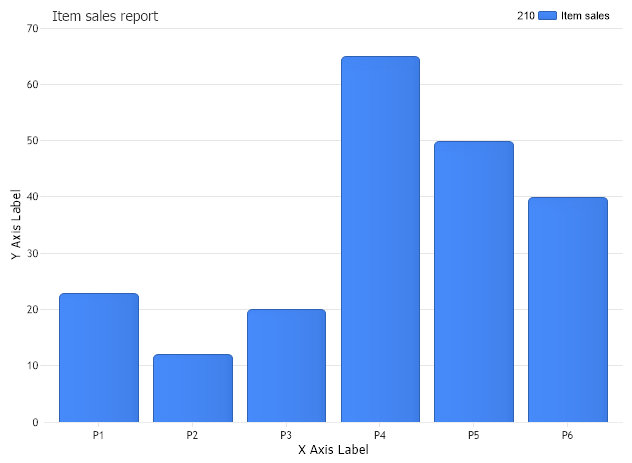
// Set the x axis label Chart.ChartArea.XAxis.Label.Text="X Axis Label";
// Set the y axis label Chart.ChartArea.YAxis.Label.Text="Y Axis Label"; Chart.TempDirectory="temp"; Chart.Debug=true; Chart.TitleBox.Position = TitleBoxPosition.FullWithLegend;
return myProducts; } public class Products : System.Collections.CollectionBase { public int Add(Product newProduct) { return List.Add(newProduct);
}
} public class Product { string name; double total; public Product() { } public Product(string proName,double proTotal) { name = proName; total = proTotal; }
public string Name { get { return name; } set { name = value; } } public double Total { get { return total; } set { total = value; } }
<script runat="server"> Sub Page_Load(ByVal sender As Object, ByVal e As EventArgs) 'set global properties Chart.Title="Item sales report"
' Set the x axis label Chart.ChartArea.XAxis.Label.Text="X Axis Label"
' Set the y axis label Chart.ChartArea.YAxis.Label.Text="Y Axis Label" Chart.TempDirectory="temp" Chart.Debug=True Chart.TitleBox.Position = TitleBoxPosition.FullWithLegend
End Sub Function CreateObjectCollection() As Products Dim myProducts As Products = New Products() myProducts.Add(New Product("P1",23)) myProducts.Add(New Product("P2",12)) myProducts.Add(New Product("P3",20)) myProducts.Add(New Product("P4",65)) myProducts.Add(New Product("P5",50)) myProducts.Add(New Product("P6",40))
Return myProducts End Function Public Class Products Inherits System.Collections.CollectionBase Public Function Add(ByVal newProduct As Product) As Integer Return List.Add(newProduct)
End Function
End Class Public Class Product Dim name_Renamed As String Dim total_Renamed As Double Public Sub New() End Sub Public Sub New(ByVal proName As String, ByVal proTotal As Double) name_Renamed = proName total_Renamed = proTotal End Sub
Public Property Name() As String Get Return name_Renamed End Get Set(ByVal value As String) name_Renamed = value End Set End Property Public Property Total() As Double Get Return total_Renamed End Get Set(ByVal value As Double) total_Renamed = value End Set End Property

 Previous