Hash Table
Demonstrates using HashTable and Series.Data property.
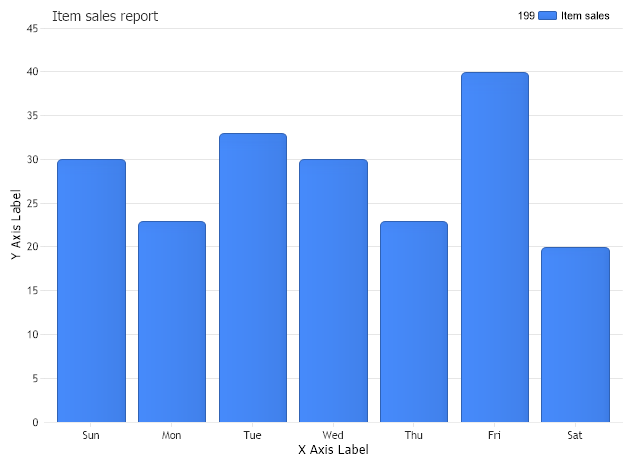
<%@ Page Language="C#" trace="false" Description="dotnetCHARTING Component"%>
<%@ Register TagPrefix="dotnet" Namespace="dotnetCHARTING" Assembly="dotnetCHARTING"%>
<%@ Import Namespace="System.Drawing" %>
<%@ Import Namespace="System.Data" %>
<%@ Import Namespace="System.Data.OleDb" %>
<script runat="server">
void Page_Load(Object sender,EventArgs e)
{
//set global properties
Chart.Title="Item sales report";
// Set the x axis label
Chart.ChartArea.XAxis.Label.Text="X Axis Label";
// Set the y axis label
Chart.ChartArea.YAxis.Label.Text="Y Axis Label";
Chart.TempDirectory="temp";
Chart.Debug=true;
Chart.TitleBox.Position = TitleBoxPosition.FullWithLegend;
//Adding series programatically
Chart.Series.Name = "Item sales";
Chart.Series.DataFields="xAxis=Name,yAxis=Total";
//If the hash table value is object, the fields can be any property in the object.
Chart.Series.Data = CreateHashTable();
//For CreateHashTable2, because the key is string , the order of keys in the hash table is unspecified.
//Chart.Series.Data = CreateHashTable2();
//Chart.Series.DataFields="xAxis=key,yAxis=value";
//If the value is not object type, the fields can set to key or value.
//Chart.Series.DataFields="xAxis=value,yAxis=key";
//Chart.Series.Data = CreateHashTable3()
Chart.SeriesCollection.Add();
}
Hashtable CreateHashTable()
{
Hashtable h = new Hashtable();
h.Add (1,new Product("Sun", 30));
h.Add (2,new Product("Mon", 23));
h.Add (3,new Product("Tue", 33));
h.Add (4,new Product("Wed", 30));
h.Add (5,new Product("Thu", 23));
h.Add (6,new Product("Fri", 40));
h.Add (7,new Product("Sat", 20));
return h;
}
Hashtable CreateHashTable2()
{
Hashtable h = new Hashtable();
h.Add ("Sun", 30);
h.Add ("Mon", 23);
h.Add ("Tue", 33);
h.Add ("Wed", 30);
h.Add ("Thu", 23);
h.Add ("Fri", 40);
h.Add ("Sat", 20);
return h;
}
Hashtable CreateHashTable3()
{
Hashtable h = new Hashtable();
h.Add (1,"Sun");
h.Add (2,"Mon");
h.Add (3,"Tue");
h.Add (4,"Wed");
h.Add (5,"Thu");
h.Add (6,"Fri");
h.Add (7,"Sat");
return h;
}
public class Product
{
string name;
double total;
public Product()
{
}
public Product(string proName,double proTotal)
{
name = proName;
total = proTotal;
}
public string Name
{
get
{
return name;
}
set
{
name = value;
}
}
public double Total
{
get
{
return total;
}
set
{
total = value;
}
}
}
</script>
<html xmlns="http://www.w3.org/1999/xhtml">
<head>
<title>hash Table Sample</title>
</head>
<body>
<div style="text-align:center">
<dotnet:Chart id="Chart" runat="server"/>
</div>
</body>
</html>
<%@ Page Language="vb" trace="false" Description="dotnetCHARTING Component"%>
<%@ Register TagPrefix="dotnet" Namespace="dotnetCHARTING" Assembly="dotnetCHARTING"%>
<%@ Import Namespace="System.Drawing" %>
<%@ Import Namespace="System.Data" %>
<%@ Import Namespace="System.Data.OleDb" %>
<script runat="server">
Sub Page_Load(ByVal sender As Object, ByVal e As EventArgs)
'set global properties
Chart.Title="Item sales report"
' Set the x axis label
Chart.ChartArea.XAxis.Label.Text="X Axis Label"
' Set the y axis label
Chart.ChartArea.YAxis.Label.Text="Y Axis Label"
Chart.TempDirectory="temp"
Chart.Debug=True
Chart.TitleBox.Position = TitleBoxPosition.FullWithLegend
'Adding series programatically
Chart.Series.Name = "Item sales"
Chart.Series.DataFields="xAxis=Name,yAxis=Total"
'If the hash table value is object, the fields can be any property in the object.
Chart.Series.Data = CreateHashTable()
'For CreateHashTable2, because the key is string , the order of keys in the hash table is unspecified.
'Chart.Series.Data = CreateHashTable2();
'Chart.Series.DataFields="xAxis=key,yAxis=value";
'If the value is not object type, the fields can set to key or value.
'Chart.Series.DataFields="xAxis=value,yAxis=key";
'Chart.Series.Data = CreateHashTable3()
Chart.SeriesCollection.Add()
End Sub
Function CreateHashTable() As Hashtable
Dim h As Hashtable = New Hashtable()
h.Add (1,New Product("Sun", 30))
h.Add (2,New Product("Mon", 23))
h.Add (3,New Product("Tue", 33))
h.Add (4,New Product("Wed", 30))
h.Add (5,New Product("Thu", 23))
h.Add (6,New Product("Fri", 40))
h.Add (7,New Product("Sat", 20))
Return h
End Function
Function CreateHashTable2() As Hashtable
Dim h As Hashtable = New Hashtable()
h.Add ("Sun", 30)
h.Add ("Mon", 23)
h.Add ("Tue", 33)
h.Add ("Wed", 30)
h.Add ("Thu", 23)
h.Add ("Fri", 40)
h.Add ("Sat", 20)
Return h
End Function
Function CreateHashTable3() As Hashtable
Dim h As Hashtable = New Hashtable()
h.Add (1,"Sun")
h.Add (2,"Mon")
h.Add (3,"Tue")
h.Add (4,"Wed")
h.Add (5,"Thu")
h.Add (6,"Fri")
h.Add (7,"Sat")
Return h
End Function
Public Class Product
Dim name_Renamed As String
Dim total_Renamed As Double
Public Sub New()
End Sub
Public Sub New(ByVal proName As String, ByVal proTotal As Double)
name_Renamed = proName
total_Renamed = proTotal
End Sub
Public Property Name() As String
Get
Return name_Renamed
End Get
Set(ByVal value As String)
name_Renamed = value
End Set
End Property
Public Property Total() As Double
Get
Return total_Renamed
End Get
Set(ByVal value As Double)
total_Renamed = value
End Set
End Property
End Class
</script>
<html xmlns="http://www.w3.org/1999/xhtml">
<head>
<title>hash Table Sample</title>
</head>
<body>
<div style="text-align:center">
<dotnet:Chart id="Chart" runat="server"/>
</div>
</body>
</html>

 Previous