Bar Full Options
Demonstrates several features of the BarFull microChart.
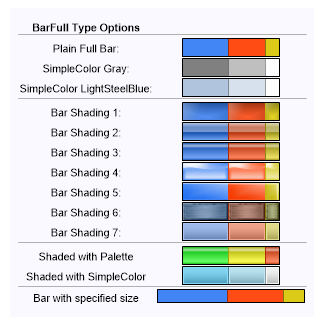
<%@ Page Language="C#" Description="dotnetCHARTING Component" %>
<%@ Register TagPrefix="dotnet" Namespace="dotnetCHARTING" Assembly="dotnetCHARTING" %>
<%@ Import Namespace="System.Drawing" %>
<script runat="server">
void Page_Load(Object sender, EventArgs e)
{
// Demonstrates several features of the BarFull microChart.
Chart.TempDirectory = "temp";
Chart.Background.Color = Color.FromArgb(249,249,255);
Chart.Size = "320x320";
string s = "<block fStyle='Bold'>BarFull Type Options<block><hr>";
// Plain full bar
s += "Plain Full Bar: <Chart:BarFull values='10,8,3' >";
// BarFull using the simpleColor feature.
s += "<row>SimpleColor Gray: <Chart:BarFull values='10,8,3' Color='Gray'>";
s += "<row>SimpleColor LightSteelBlue: <Chart:BarFull values='10,8,3' Color='LightSteelBlue'><hr>";
// Bar Full Shading Effect Modes.
s += "<row>Bar Shading 1: <Chart:BarFull values='10,8,3' shading='1'>";
s += "<row>Bar Shading 2: <Chart:BarFull values='10,8,3' shading='2'>";
s += "<row>Bar Shading 3: <Chart:BarFull values='10,8,3' shading='3'>";
s += "<row>Bar Shading 4: <Chart:BarFull values='10,8,3' shading='4'>";
s += "<row>Bar Shading 5: <Chart:BarFull values='10,8,3' shading='5'>";
s += "<row>Bar Shading 6: <Chart:BarFull values='10,8,3' shading='6'>";
s += "<row>Bar Shading 7: <Chart:BarFull values='10,8,3' shading='7'><hr>";
// Specifying a color palette
s += "<row>Shaded with Palette <Chart:BarFull values='10,8,3' colors='#31FF31,#FFFF00,#FF6331,#009CFF' shading='3'>";
s += "<row>Shaded with SimpleColor<Chart:BarFull values='10,8,3' color='DeepSkyBlue' shading='7'><hr>";
// Specifying a size.
s += "<row>Bar with specified size <Chart:BarFull values='10,8,3' width='150' height='15' >";
Chart.ObjectChart = new dotnetCHARTING.Label(s);
}
</script>
<html xmlns="http://www.w3.org/1999/xhtml">
<head>
<title>.netCHARTING Sample</title>
</head>
<body>
<div align="center">
<dotnet:Chart ID="Chart" runat="server" />
</div>
</body>
</html>
<%@ Page Language="vb" Description="dotnetCHARTING Component" %>
<%@ Register TagPrefix="dotnet" Namespace="dotnetCHARTING" Assembly="dotnetCHARTING" %>
<%@ Import Namespace="System.Drawing" %>
<script runat="server">
Sub Page_Load(ByVal sender As Object, ByVal e As EventArgs)
' Demonstrates several features of the BarFull microChart.
Chart.TempDirectory = "temp"
Chart.Background.Color = Color.FromArgb(249,249,255)
Chart.Size = "320x320"
Dim s As String = "<block fStyle='Bold'>BarFull Type Options<block><hr>"
' Plain full bar
s &= "Plain Full Bar: <Chart:BarFull values='10,8,3' >"
' BarFull using the simpleColor feature.
s &= "<row>SimpleColor Gray: <Chart:BarFull values='10,8,3' Color='Gray'>"
s &= "<row>SimpleColor LightSteelBlue: <Chart:BarFull values='10,8,3' Color='LightSteelBlue'><hr>"
' Bar Full Shading Effect Modes.
s &= "<row>Bar Shading 1: <Chart:BarFull values='10,8,3' shading='1'>"
s &= "<row>Bar Shading 2: <Chart:BarFull values='10,8,3' shading='2'>"
s &= "<row>Bar Shading 3: <Chart:BarFull values='10,8,3' shading='3'>"
s &= "<row>Bar Shading 4: <Chart:BarFull values='10,8,3' shading='4'>"
s &= "<row>Bar Shading 5: <Chart:BarFull values='10,8,3' shading='5'>"
s &= "<row>Bar Shading 6: <Chart:BarFull values='10,8,3' shading='6'>"
s &= "<row>Bar Shading 7: <Chart:BarFull values='10,8,3' shading='7'><hr>"
' Specifying a color palette
s &= "<row>Shaded with Palette <Chart:BarFull values='10,8,3' colors='#31FF31,#FFFF00,#FF6331,#009CFF' shading='3'>"
s &= "<row>Shaded with SimpleColor<Chart:BarFull values='10,8,3' color='DeepSkyBlue' shading='7'><hr>"
' Specifying a size.
s &= "<row>Bar with specified size <Chart:BarFull values='10,8,3' width='150' height='15' >"
Chart.ObjectChart = New dotnetCHARTING.Label(s)
End Sub
</script>
<html xmlns="http://www.w3.org/1999/xhtml">
<head>
<title>.netCHARTING Sample</title>
</head>
<body>
<div align="center">
<dotnet:Chart ID="Chart" runat="server" />
</div>
</body>
</html>

 Previous