Gallery
Legend Charts
<%@ Page Language="C#" Description="dotnetCHARTING Component" %>
<%@ Register TagPrefix="dotnet" Namespace="dotnetCHARTING" Assembly="dotnetCHARTING" %>
<%@ Import Namespace="System.Drawing" %>
<%@ Import Namespace="System.Drawing.Drawing2D" %>
<%@ Import Namespace="dotnetCHARTING.Mapping" %>
<script runat="server">
void Page_Load(Object sender, EventArgs e)
{
// Demonstrates adding a bullet microChart into a legend box value column and use a scale MicroChart for the column head.
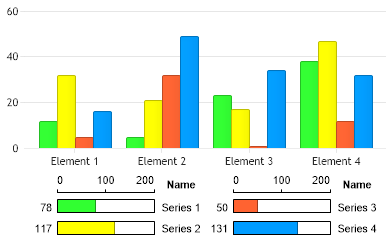
Chart.Type = ChartType.Combo;
Chart.Size = "400x250";
Chart.TempDirectory = "temp";
Chart.Debug = true;
Chart.Palette = new Color[] { Color.FromArgb(49, 255, 49), Color.FromArgb(255, 255, 0), Color.FromArgb(255, 99, 49), Color.FromArgb(0, 156, 255) };
Chart.LegendBox.Orientation = dotnetCHARTING.Orientation.Bottom;
Chart.LegendBox.Padding = 2;
Chart.LegendBox.Template = "%YValue%Value%Name";
Chart.LegendBox.ColumnAlignments = new StringAlignment[] { StringAlignment.Far, StringAlignment.Far, StringAlignment.Center };
// This line will replace the default %YSum token with a microchart that displays it.
Chart.LegendBox.DefaultEntry.Value = "<Chart:Bar value='%YSum' max='200' height='15' color='#%Color'>";
Chart.LegendBox.HeaderEntry.Visible = true;
Chart.LegendBox.HeaderEntry.HeaderMode = LegendEntryHeaderMode.RepeatOnEachColumn;
// Hide the YValue column header text.
Chart.LegendBox.HeaderEntry.CustomAttributes.Add("YValue", " ");
// Show a MicroScale in the value column.
Chart.LegendBox.HeaderEntry.Value = "<Chart:Scale min='0' max='200' height='20'>";
Chart.LegendBox.HeaderEntry.DividerLine.Color = Color.Empty;
// Add the random data.
Chart.SeriesCollection.Add(getRandomData());
}
SeriesCollection getRandomData()
{
Random myR = new Random(1);
SeriesCollection SC = new SeriesCollection();
for (int a = 1; a < 5; a++)
{
Series s = new Series("Series " + a.ToString());
for (int b = 1; b < 5; b++)
{
Element e = new Element("Element " + b.ToString());
e.YValue = myR.Next(50);
s.Elements.Add(e);
}
SC.Add(s);
}
return SC;
}
SeriesCollection getLiveData()
{
DataEngine de = new DataEngine("ConnectionString goes here");
de.ChartObject = Chart; // Necessary to view any errors the dataEngine may throw.
de.SqlStatement = "SELECT XAxisColumn, YAxisColumn FROM ....";
return de.GetSeries();
}
</script>
<html xmlns="http://www.w3.org/1999/xhtml">
<head>
<title>.netCHARTING Sample</title>
</head>
<body>
<div align="center">
<dotnet:Chart ID="Chart" runat="server" />
</div>
</body>
</html>
<%@ Page Language="vb" Description="dotnetCHARTING Component" %>
<%@ Register TagPrefix="dotnet" Namespace="dotnetCHARTING" Assembly="dotnetCHARTING" %>
<%@ Import Namespace="System.Drawing" %>
<%@ Import Namespace="System.Drawing.Drawing2D" %>
<%@ Import Namespace="dotnetCHARTING.Mapping" %>
<script runat="server">
Sub Page_Load(ByVal sender As Object, ByVal e As EventArgs)
' Demonstrates adding a bullet microChart into a legend box value column and use a scale MicroChart for the column head.
Chart.Type = ChartType.Combo
Chart.Size = "400x250"
Chart.TempDirectory = "temp"
Chart.Debug = True
Chart.Palette = New Color() { Color.FromArgb(49, 255, 49), Color.FromArgb(255, 255, 0), Color.FromArgb(255, 99, 49), Color.FromArgb(0, 156, 255) }
Chart.LegendBox.Orientation = dotnetCHARTING.Orientation.Bottom
Chart.LegendBox.Padding = 2
Chart.LegendBox.Template = "%YValue%Value%Name"
Chart.LegendBox.ColumnAlignments = New StringAlignment() { StringAlignment.Far, StringAlignment.Far, StringAlignment.Center }
' This line will replace the default %YSum token with a microchart that displays it.
Chart.LegendBox.DefaultEntry.Value = "<Chart:Bar value='%YSum' max='200' height='15' color='#%Color'>"
Chart.LegendBox.HeaderEntry.Visible = True
Chart.LegendBox.HeaderEntry.HeaderMode = LegendEntryHeaderMode.RepeatOnEachColumn
' Hide the YValue column header text.
Chart.LegendBox.HeaderEntry.CustomAttributes.Add("YValue", " ")
' Show a MicroScale in the value column.
Chart.LegendBox.HeaderEntry.Value = "<Chart:Scale min='0' max='200' height='20'>"
Chart.LegendBox.HeaderEntry.DividerLine.Color = Color.Empty
' Add the random data.
Chart.SeriesCollection.Add(getRandomData())
End Sub
Function getRandomData() As SeriesCollection
Dim myR As Random = New Random(1)
Dim SC As SeriesCollection = New SeriesCollection()
For a As Integer = 1 To 4
Dim s As Series = New Series("Series " & a.ToString())
For b As Integer = 1 To 4
Dim e As Element = New Element("Element " & b.ToString())
e.YValue = myR.Next(50)
s.Elements.Add(e)
Next b
SC.Add(s)
Next a
Return SC
End Function
Function getLiveData() As SeriesCollection
Dim de As DataEngine = New DataEngine("ConnectionString goes here")
de.ChartObject = Chart ' Necessary to view any errors the dataEngine may throw.
de.SqlStatement = "SELECT XAxisColumn, YAxisColumn FROM ...."
Return de.GetSeries()
End Function
</script>
<html xmlns="http://www.w3.org/1999/xhtml">
<head>
<title>.netCHARTING Sample</title>
</head>
<body>
<div align="center">
<dotnet:Chart ID="Chart" runat="server" />
</div>
</body>
</html>
- Sample FilenameLegendCharts.aspx
- Version5.2
- Uses DatabaseNo