Gallery

 Previous
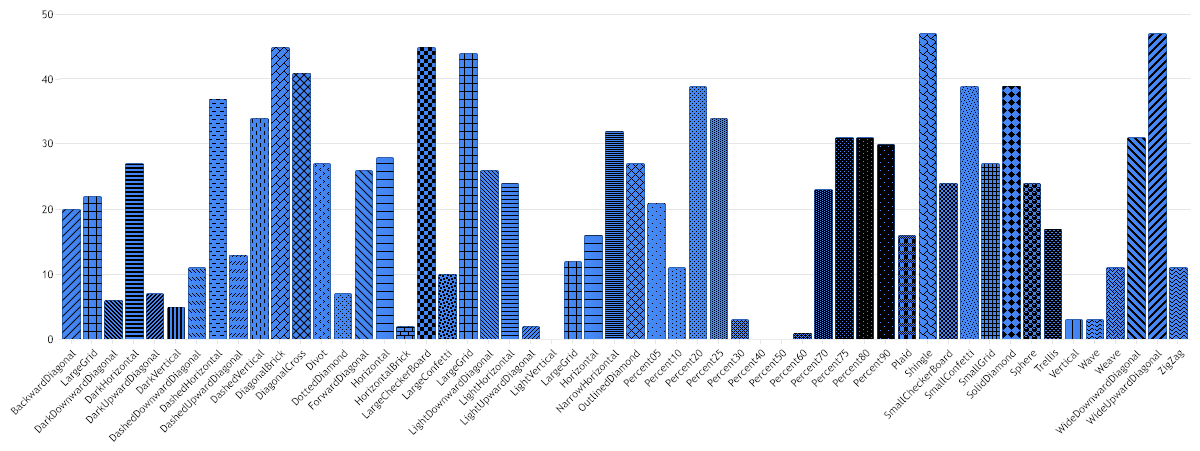
Hatch Palette
<%@ Page Language="C#" Description="dotnetCHARTING Component" %>
<%@ Register TagPrefix="dotnet" Namespace="dotnetCHARTING" Assembly="dotnetCHARTING"%>
<%@ Import Namespace="System.Drawing" %>
<%@ Import Namespace="System.Drawing.Drawing2D" %>
<html xmlns="http://www.w3.org/1999/xhtml">
<head>
<title>.netCHARTING Sample</title>
<script runat="server">
void Page_Load(Object sender,EventArgs e)
{
Chart.Type = ChartType.Combo;//Horizontal;
Chart.Width = 1200;
Chart.Height = 450;
Chart.TempDirectory = "temp";
Chart.Debug = true;
Chart.LegendBox.Position = LegendBoxPosition.None;
// This sample show what the hatch styles are available.
// First we get our data, if you would like to get the data from a database you need to use
// the data engine. See sample: features/dataEngine.aspx. Or the dataEngine tutorial in the help file.
SeriesCollection mySC = getRandomData();
//Set hatch styles indivisually so names are available for the x axis
mySC[0].Elements[0].HatchStyle = HatchStyle.BackwardDiagonal;
mySC[0].Elements[1].HatchStyle = HatchStyle.Cross;
mySC[0].Elements[2].HatchStyle = HatchStyle.DarkDownwardDiagonal;
mySC[0].Elements[3].HatchStyle = HatchStyle.DarkHorizontal;
mySC[0].Elements[4].HatchStyle = HatchStyle.DarkUpwardDiagonal;
mySC[0].Elements[5].HatchStyle = HatchStyle.DarkVertical;
mySC[0].Elements[6].HatchStyle = HatchStyle.DashedDownwardDiagonal;
mySC[0].Elements[7].HatchStyle = HatchStyle.DashedHorizontal;
mySC[0].Elements[8].HatchStyle = HatchStyle.DashedUpwardDiagonal;
mySC[0].Elements[9].HatchStyle = HatchStyle.DashedVertical;
mySC[0].Elements[10].HatchStyle = HatchStyle.DiagonalBrick;
mySC[0].Elements[11].HatchStyle = HatchStyle.DiagonalCross;
mySC[0].Elements[12].HatchStyle = HatchStyle.Divot;
mySC[0].Elements[13].HatchStyle = HatchStyle.DottedDiamond;
mySC[0].Elements[14].HatchStyle = HatchStyle.ForwardDiagonal;
mySC[0].Elements[15].HatchStyle = HatchStyle.Horizontal;
mySC[0].Elements[16].HatchStyle = HatchStyle.HorizontalBrick;
mySC[0].Elements[17].HatchStyle = HatchStyle.LargeCheckerBoard;
mySC[0].Elements[18].HatchStyle = HatchStyle.LargeConfetti;
mySC[0].Elements[19].HatchStyle = HatchStyle.LargeGrid;
mySC[0].Elements[20].HatchStyle = HatchStyle.LightDownwardDiagonal;
mySC[0].Elements[21].HatchStyle = HatchStyle.LightHorizontal;
mySC[0].Elements[22].HatchStyle = HatchStyle.LightUpwardDiagonal;
mySC[0].Elements[23].HatchStyle = HatchStyle.LightVertical;
mySC[0].Elements[24].HatchStyle = HatchStyle.Max;
mySC[0].Elements[25].HatchStyle = HatchStyle.Min;
mySC[0].Elements[26].HatchStyle = HatchStyle.NarrowHorizontal;
mySC[0].Elements[27].HatchStyle = HatchStyle.OutlinedDiamond;
mySC[0].Elements[28].HatchStyle = HatchStyle.Percent05;
mySC[0].Elements[29].HatchStyle = HatchStyle.Percent10;
mySC[0].Elements[30].HatchStyle = HatchStyle.Percent20;
mySC[0].Elements[31].HatchStyle = HatchStyle.Percent25;
mySC[0].Elements[32].HatchStyle = HatchStyle.Percent30;
mySC[0].Elements[33].HatchStyle = HatchStyle.Percent40;
mySC[0].Elements[34].HatchStyle = HatchStyle.Percent50;
mySC[0].Elements[35].HatchStyle = HatchStyle.Percent60;
mySC[0].Elements[36].HatchStyle = HatchStyle.Percent70;
mySC[0].Elements[37].HatchStyle = HatchStyle.Percent75;
mySC[0].Elements[38].HatchStyle = HatchStyle.Percent80;
mySC[0].Elements[39].HatchStyle = HatchStyle.Percent90;
mySC[0].Elements[40].HatchStyle = HatchStyle.Plaid;
mySC[0].Elements[41].HatchStyle = HatchStyle.Shingle;
mySC[0].Elements[42].HatchStyle = HatchStyle.SmallCheckerBoard;
mySC[0].Elements[43].HatchStyle = HatchStyle.SmallConfetti;
mySC[0].Elements[44].HatchStyle = HatchStyle.SmallGrid;
mySC[0].Elements[45].HatchStyle = HatchStyle.SolidDiamond;
mySC[0].Elements[46].HatchStyle = HatchStyle.Sphere;
mySC[0].Elements[47].HatchStyle = HatchStyle.Trellis;
mySC[0].Elements[48].HatchStyle = HatchStyle.Vertical;
mySC[0].Elements[49].HatchStyle = HatchStyle.Wave;
mySC[0].Elements[50].HatchStyle = HatchStyle.Weave;
mySC[0].Elements[51].HatchStyle = HatchStyle.WideDownwardDiagonal;
mySC[0].Elements[52].HatchStyle = HatchStyle.WideUpwardDiagonal;
mySC[0].Elements[53].HatchStyle = HatchStyle.ZigZag;
Chart.DefaultSeries.DefaultElement.HatchColor = Color.Black;
foreach(Element el in mySC[0].Elements)
{
el.Name = el.HatchStyle.ToString();
}
// Add the random data.
Chart.SeriesCollection.Add(mySC);
}
SeriesCollection getRandomData()
{
SeriesCollection SC = new SeriesCollection();
Random myR = new Random();
for(int a = 1; a < 2; a++)
{
Series s = new Series();
s.Name = "Series " + a;
for(int b = 1; b < 55; b++)
{
Element e = new Element();
e.Name = "Element " + b;
e.YValue = myR.Next(50);
s.Elements.Add(e);
}
SC.Add(s);
}
return SC;
}
</script>
</head>
<body>
<div style="text-align:center">
<dotnet:Chart id="Chart" runat="server" Width="568px" Height="344px">
</dotnet:Chart>
</div>
</body>
</html>
<%@ Page Language="vb" Description="dotnetCHARTING Component" %>
<%@ Register TagPrefix="dotnet" Namespace="dotnetCHARTING" Assembly="dotnetCHARTING"%>
<%@ Import Namespace="System.Drawing" %>
<%@ Import Namespace="System.Drawing.Drawing2D" %>
<html xmlns="http://www.w3.org/1999/xhtml">
<head>
<title>.netCHARTING Sample</title>
<script runat="server">
Sub Page_Load(ByVal sender As Object, ByVal e As EventArgs)
Chart.Type = ChartType.Combo 'Horizontal;
Chart.Width = 1200
Chart.Height = 450
Chart.TempDirectory = "temp"
Chart.Debug = True
Chart.LegendBox.Position = LegendBoxPosition.None
' This sample show what the hatch styles are available.
' First we get our data, if you would like to get the data from a database you need to use
' the data engine. See sample: features/dataEngine.aspx. Or the dataEngine tutorial in the help file.
Dim mySC As SeriesCollection = getRandomData()
'Set hatch styles indivisually so names are available for the x axis
mySC(0).Elements(0).HatchStyle = HatchStyle.BackwardDiagonal
mySC(0).Elements(1).HatchStyle = HatchStyle.Cross
mySC(0).Elements(2).HatchStyle = HatchStyle.DarkDownwardDiagonal
mySC(0).Elements(3).HatchStyle = HatchStyle.DarkHorizontal
mySC(0).Elements(4).HatchStyle = HatchStyle.DarkUpwardDiagonal
mySC(0).Elements(5).HatchStyle = HatchStyle.DarkVertical
mySC(0).Elements(6).HatchStyle = HatchStyle.DashedDownwardDiagonal
mySC(0).Elements(7).HatchStyle = HatchStyle.DashedHorizontal
mySC(0).Elements(8).HatchStyle = HatchStyle.DashedUpwardDiagonal
mySC(0).Elements(9).HatchStyle = HatchStyle.DashedVertical
mySC(0).Elements(10).HatchStyle = HatchStyle.DiagonalBrick
mySC(0).Elements(11).HatchStyle = HatchStyle.DiagonalCross
mySC(0).Elements(12).HatchStyle = HatchStyle.Divot
mySC(0).Elements(13).HatchStyle = HatchStyle.DottedDiamond
mySC(0).Elements(14).HatchStyle = HatchStyle.ForwardDiagonal
mySC(0).Elements(15).HatchStyle = HatchStyle.Horizontal
mySC(0).Elements(16).HatchStyle = HatchStyle.HorizontalBrick
mySC(0).Elements(17).HatchStyle = HatchStyle.LargeCheckerBoard
mySC(0).Elements(18).HatchStyle = HatchStyle.LargeConfetti
mySC(0).Elements(19).HatchStyle = HatchStyle.LargeGrid
mySC(0).Elements(20).HatchStyle = HatchStyle.LightDownwardDiagonal
mySC(0).Elements(21).HatchStyle = HatchStyle.LightHorizontal
mySC(0).Elements(22).HatchStyle = HatchStyle.LightUpwardDiagonal
mySC(0).Elements(23).HatchStyle = HatchStyle.LightVertical
mySC(0).Elements(24).HatchStyle = HatchStyle.Max
mySC(0).Elements(25).HatchStyle = HatchStyle.Min
mySC(0).Elements(26).HatchStyle = HatchStyle.NarrowHorizontal
mySC(0).Elements(27).HatchStyle = HatchStyle.OutlinedDiamond
mySC(0).Elements(28).HatchStyle = HatchStyle.Percent05
mySC(0).Elements(29).HatchStyle = HatchStyle.Percent10
mySC(0).Elements(30).HatchStyle = HatchStyle.Percent20
mySC(0).Elements(31).HatchStyle = HatchStyle.Percent25
mySC(0).Elements(32).HatchStyle = HatchStyle.Percent30
mySC(0).Elements(33).HatchStyle = HatchStyle.Percent40
mySC(0).Elements(34).HatchStyle = HatchStyle.Percent50
mySC(0).Elements(35).HatchStyle = HatchStyle.Percent60
mySC(0).Elements(36).HatchStyle = HatchStyle.Percent70
mySC(0).Elements(37).HatchStyle = HatchStyle.Percent75
mySC(0).Elements(38).HatchStyle = HatchStyle.Percent80
mySC(0).Elements(39).HatchStyle = HatchStyle.Percent90
mySC(0).Elements(40).HatchStyle = HatchStyle.Plaid
mySC(0).Elements(41).HatchStyle = HatchStyle.Shingle
mySC(0).Elements(42).HatchStyle = HatchStyle.SmallCheckerBoard
mySC(0).Elements(43).HatchStyle = HatchStyle.SmallConfetti
mySC(0).Elements(44).HatchStyle = HatchStyle.SmallGrid
mySC(0).Elements(45).HatchStyle = HatchStyle.SolidDiamond
mySC(0).Elements(46).HatchStyle = HatchStyle.Sphere
mySC(0).Elements(47).HatchStyle = HatchStyle.Trellis
mySC(0).Elements(48).HatchStyle = HatchStyle.Vertical
mySC(0).Elements(49).HatchStyle = HatchStyle.Wave
mySC(0).Elements(50).HatchStyle = HatchStyle.Weave
mySC(0).Elements(51).HatchStyle = HatchStyle.WideDownwardDiagonal
mySC(0).Elements(52).HatchStyle = HatchStyle.WideUpwardDiagonal
mySC(0).Elements(53).HatchStyle = HatchStyle.ZigZag
Chart.DefaultSeries.DefaultElement.HatchColor = Color.Black
For Each el As Element In mySC(0).Elements
el.Name = el.HatchStyle.ToString()
Next el
' Add the random data.
Chart.SeriesCollection.Add(mySC)
End Sub
Function getRandomData() As SeriesCollection
Dim SC As SeriesCollection = New SeriesCollection()
Dim myR As Random = New Random()
For a As Integer = 1 To 1
Dim s As Series = New Series()
s.Name = "Series " & a
For b As Integer = 1 To 54
Dim e As Element = New Element()
e.Name = "Element " & b
e.YValue = myR.Next(50)
s.Elements.Add(e)
Next b
SC.Add(s)
Next a
Return SC
End Function
</script>
</head>
<body>
<div style="text-align:center">
<dotnet:Chart id="Chart" runat="server" Width="568px" Height="344px">
</dotnet:Chart>
</div>
</body>
</html>
- Sample FilenameHatchPalette.aspx
- VersionLegacy (Pre 3.0)
- Uses DatabaseNo