Gallery

 Previous
<%@ Page Language="C#" Description="dotnetCHARTING Component" %>
<%@ Register TagPrefix="dotnet" Namespace="dotnetCHARTING" Assembly="dotnetCHARTING"%>
<%@ Import Namespace="System.Drawing" %>
<%@ Import Namespace="System.Drawing.Drawing2D" %>
<html xmlns="http://www.w3.org/1999/xhtml">
<head>
<title>Empty Element 2</title>
<script runat="server">
void Page_Load(Object sender,EventArgs e)
{
Chart.Type = ChartType.ComboSideBySide;//Horizontal;
Chart.Width = 800;
Chart.Height = 200;
Chart.TempDirectory = "temp";
Chart.Use3D = false;
Chart.Debug = true;
Chart.XAxis.SpacingPercentage = 5;
Chart.LegendBox.Position = LegendBoxPosition.None;
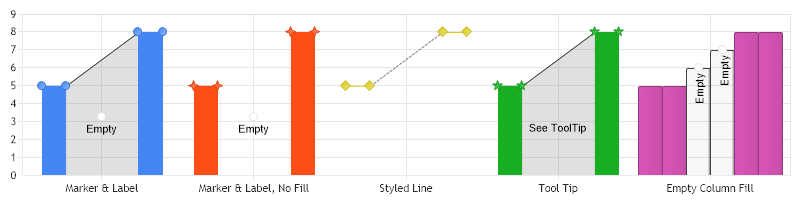
// Demonstrates advanced empty element handling. (Marking)
// Changing the default series type will show how different types behave with empty elements.
Chart.DefaultSeries.Type = SeriesType.AreaLine;
// First we get our data, if you would like to get the data from a database you need to use
// the data engine. See sample: features/dataEngine.aspx. Or the dataEngine tutorial in the help file.
SeriesCollection mySC = getData();
// Empty elements can be marked with markers and labels when using EmptyElementMode.Fill.
Chart.DefaultSeries.EmptyElement.Mode = EmptyElementMode.Fill;
// **** Using a marker and label.
mySC[0].Name = "Marker & Label";
// Set label text.
mySC[0].EmptyElement.SmartLabel.Text = "Empty";
// Set the marker type to activate it. The default color is white.
mySC[0].EmptyElement.Marker.Type = ElementMarkerType.Circle;
// **** Using a marker and label without filling the area.
mySC[1].Name = "Marker & Label, No Fill";
// This is done by making the main color and the line color transparent. The line is only shown
// in 2D with Line and AreaLine series types.
mySC[1].EmptyElement.Color = Color.Transparent;
mySC[1].EmptyElement.Line.Color = Color.Transparent;
// Set label text.
mySC[1].EmptyElement.SmartLabel.Text = "Empty";
// Set the marker type to activate it. The default color is white.
mySC[1].EmptyElement.Marker.Type = ElementMarkerType.Circle;
// **** Styled line connecting real points.
mySC[2].Name = "Styled Line";
mySC[2].Type = SeriesType.Line;
// Set the line color and dash style
mySC[2].EmptyElement.Line.DashStyle = DashStyle.Dash;
mySC[2].EmptyElement.Line.Color = Color.Gray;
// **** Empty element tool tip.
mySC[3].Name = "Tool Tip";
mySC[3].EmptyElement.SmartLabel.Text = "See ToolTip";
// Tooltip text.
mySC[3].EmptyElement.ToolTip = "Area is Empty";
// **** Labels and markers for columns and cylinders are repeated. Other types use one marker and label for
// any number of consecutive empty elements.
mySC[4].Name = "Empty Column Fill";
mySC[4].Type = SeriesType.Column;
mySC[4].EmptyElement.SmartLabel.Text = "Empty";
mySC[4].EmptyElement.Marker.Type = ElementMarkerType.Circle;
// Add the random data.
Chart.SeriesCollection.Add(mySC);
}
SeriesCollection getData()
{
SeriesCollection sc = new SeriesCollection();
Series s1 = new Series();
s1.Elements.Add(new Element("1",5));
s1.Elements.Add(new Element("2",5));
s1.Elements.Add(new Element("3",double.NaN));
s1.Elements.Add(new Element("4",double.NaN));
s1.Elements.Add(new Element("5",8));
s1.Elements.Add(new Element("6",8));
Series s2 = new Series();
s2.Elements.Add(new Element("1",5));
s2.Elements.Add(new Element("2",5));
s2.Elements.Add(new Element("3",double.NaN));
s2.Elements.Add(new Element("4",double.NaN));
s2.Elements.Add(new Element("5",8));
s2.Elements.Add(new Element("6",8));
Series s3 = new Series();
s3.Elements.Add(new Element("1",5));
s3.Elements.Add(new Element("2",5));
s3.Elements.Add(new Element("3",double.NaN));
s3.Elements.Add(new Element("4",double.NaN));
s3.Elements.Add(new Element("5",8));
s3.Elements.Add(new Element("6",8));
Series s4 = new Series();
s4.Elements.Add(new Element("1",5));
s4.Elements.Add(new Element("2",5));
s4.Elements.Add(new Element("3",double.NaN));
s4.Elements.Add(new Element("4",double.NaN));
s4.Elements.Add(new Element("5",8));
s4.Elements.Add(new Element("6",8));
Series s5 = new Series();
s5.Elements.Add(new Element("1",5));
s5.Elements.Add(new Element("2",5));
s5.Elements.Add(new Element("3",double.NaN));
s5.Elements.Add(new Element("4",double.NaN));
s5.Elements.Add(new Element("5",8));
s5.Elements.Add(new Element("6",8));
sc.Add(s5);
sc.Add(s4);
sc.Add(s3);
sc.Add(s2);
sc.Add(s1);
return sc;
}
</script>
</head>
<body>
<br>
<div style="text-align:center">
<dotnet:Chart id="Chart" runat="server" Width="568px" Height="344px">
</dotnet:Chart>
</div>
</body>
</html>
<%@ Page Language="vb" Description="dotnetCHARTING Component" %>
<%@ Register TagPrefix="dotnet" Namespace="dotnetCHARTING" Assembly="dotnetCHARTING"%>
<%@ Import Namespace="System.Drawing" %>
<%@ Import Namespace="System.Drawing.Drawing2D" %>
<html xmlns="http://www.w3.org/1999/xhtml">
<head>
<title>Empty Element 2</title>
<script runat="server">
Sub Page_Load(ByVal sender As Object, ByVal e As EventArgs)
Chart.Type = ChartType.ComboSideBySide 'Horizontal;
Chart.Width = 800
Chart.Height = 200
Chart.TempDirectory = "temp"
Chart.Use3D = False
Chart.Debug = True
Chart.XAxis.SpacingPercentage = 5
Chart.LegendBox.Position = LegendBoxPosition.None
' Demonstrates advanced empty element handling. (Marking)
' Changing the default series type will show how different types behave with empty elements.
Chart.DefaultSeries.Type = SeriesType.AreaLine
' First we get our data, if you would like to get the data from a database you need to use
' the data engine. See sample: features/dataEngine.aspx. Or the dataEngine tutorial in the help file.
Dim mySC As SeriesCollection = getData()
' Empty elements can be marked with markers and labels when using EmptyElementMode.Fill.
Chart.DefaultSeries.EmptyElement.Mode = EmptyElementMode.Fill
' **** Using a marker and label.
mySC(0).Name = "Marker & Label"
' Set label text.
mySC(0).EmptyElement.SmartLabel.Text = "Empty"
' Set the marker type to activate it. The default color is white.
mySC(0).EmptyElement.Marker.Type = ElementMarkerType.Circle
' **** Using a marker and label without filling the area.
mySC(1).Name = "Marker & Label, No Fill"
' This is done by making the main color and the line color transparent. The line is only shown
' in 2D with Line and AreaLine series types.
mySC(1).EmptyElement.Color = Color.Transparent
mySC(1).EmptyElement.Line.Color = Color.Transparent
' Set label text.
mySC(1).EmptyElement.SmartLabel.Text = "Empty"
' Set the marker type to activate it. The default color is white.
mySC(1).EmptyElement.Marker.Type = ElementMarkerType.Circle
' **** Styled line connecting real points.
mySC(2).Name = "Styled Line"
mySC(2).Type = SeriesType.Line
' Set the line color and dash style
mySC(2).EmptyElement.Line.DashStyle = DashStyle.Dash
mySC(2).EmptyElement.Line.Color = Color.Gray
' **** Empty element tool tip.
mySC(3).Name = "Tool Tip"
mySC(3).EmptyElement.SmartLabel.Text = "See ToolTip"
' Tooltip text.
mySC(3).EmptyElement.ToolTip = "Area is Empty"
' **** Labels and markers for columns and cylinders are repeated. Other types use one marker and label for
' any number of consecutive empty elements.
mySC(4).Name = "Empty Column Fill"
mySC(4).Type = SeriesType.Column
mySC(4).EmptyElement.SmartLabel.Text = "Empty"
mySC(4).EmptyElement.Marker.Type = ElementMarkerType.Circle
' Add the random data.
Chart.SeriesCollection.Add(mySC)
End Sub
Function getData() As SeriesCollection
Dim sc As SeriesCollection = New SeriesCollection()
Dim s1 As Series = New Series()
s1.Elements.Add(New Element("1",5))
s1.Elements.Add(New Element("2",5))
s1.Elements.Add(New Element("3",Double.NaN))
s1.Elements.Add(New Element("4",Double.NaN))
s1.Elements.Add(New Element("5",8))
s1.Elements.Add(New Element("6",8))
Dim s2 As Series = New Series()
s2.Elements.Add(New Element("1",5))
s2.Elements.Add(New Element("2",5))
s2.Elements.Add(New Element("3",Double.NaN))
s2.Elements.Add(New Element("4",Double.NaN))
s2.Elements.Add(New Element("5",8))
s2.Elements.Add(New Element("6",8))
Dim s3 As Series = New Series()
s3.Elements.Add(New Element("1",5))
s3.Elements.Add(New Element("2",5))
s3.Elements.Add(New Element("3",Double.NaN))
s3.Elements.Add(New Element("4",Double.NaN))
s3.Elements.Add(New Element("5",8))
s3.Elements.Add(New Element("6",8))
Dim s4 As Series = New Series()
s4.Elements.Add(New Element("1",5))
s4.Elements.Add(New Element("2",5))
s4.Elements.Add(New Element("3",Double.NaN))
s4.Elements.Add(New Element("4",Double.NaN))
s4.Elements.Add(New Element("5",8))
s4.Elements.Add(New Element("6",8))
Dim s5 As Series = New Series()
s5.Elements.Add(New Element("1",5))
s5.Elements.Add(New Element("2",5))
s5.Elements.Add(New Element("3",Double.NaN))
s5.Elements.Add(New Element("4",Double.NaN))
s5.Elements.Add(New Element("5",8))
s5.Elements.Add(New Element("6",8))
sc.Add(s5)
sc.Add(s4)
sc.Add(s3)
sc.Add(s2)
sc.Add(s1)
Return sc
End Function
</script>
</head>
<body>
<br>
<div style="text-align:center">
<dotnet:Chart id="Chart" runat="server" Width="568px" Height="344px">
</dotnet:Chart>
</div>
</body>
</html>
- Sample FilenameEmptyElements2.aspx
- VersionLegacy (Pre 3.0)
- Uses DatabaseNo