Gallery
Arbitrary Ticks
<%@ Page Language="C#" Description="dotnetCHARTING Component" %>
<%@ Register TagPrefix="dotnet" Namespace="dotnetCHARTING" Assembly="dotnetCHARTING"%>
<%@ Import Namespace="System.Drawing" %>
<html xmlns="http://www.w3.org/1999/xhtml">
<head>
<title>.netCHARTING Sample</title>
<script runat="server">
void Page_Load(Object sender,EventArgs e)
{
Chart.Type = ChartType.Combo;
Chart.Width = 600;
Chart.Height = 350;
Chart.TempDirectory = "temp";
Chart.Debug = true;
Chart.Title = "Adding axis ticks at arbitrary positions.";
Chart.TitleBox.Position = TitleBoxPosition.FullWithLegend;
// * INTRO *
// Demonstrates how ticks can be added at any position on an axis scale.
// A numeric tick is added to the y axis and a DateTime value tick is added to the x axis.
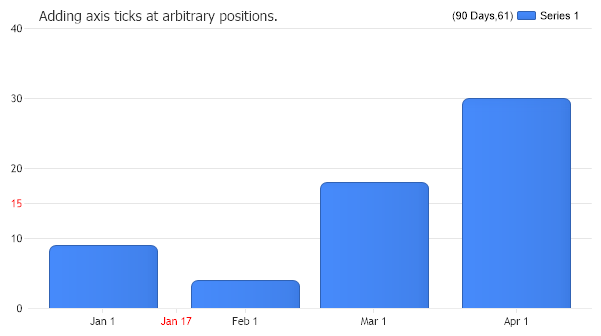
// 1. CREATE AN AXIS TICK WITH VALUE OF 15
AxisTick at = new AxisTick(15);
at.Label.Color = Color.Red;
// Add it to the axis.
Chart.YAxis.ExtraTicks.Add(at);
// Interval is set for demo purposes so the automatic ticks dont interfere with the custom tick.
Chart.YAxis.Interval = 10;
// 2. CREATE AN AXIS TICK WITH VALUE OF Jan 17 2005
AxisTick at2 = new AxisTick(new DateTime(2005,1,17));
at2.Label.Color = Color.Red;
Chart.XAxis.ExtraTicks.Add(at2);
// Set a format string to include the day part of the date.
Chart.XAxis.FormatString = "MMM d";
// 3. GET DATA
// *DYNAMIC DATA NOTE*
// This sample uses random data to populate the chart. For information on acquiring
// database data see the following resources:
// - Classic samples folder
// - Help File > Data Tutorials
// - Sample: features/DataEngine.aspx
// Add the random data.
Chart.SeriesCollection.Add(getRandomData());
}
SeriesCollection getRandomData()
{
SeriesCollection SC = new SeriesCollection();
Random myR = new Random(1);
DateTime dt = new DateTime(2005,1,1);
for(int a = 1; a < 2; a++)
{
Series s = new Series();
s.Name = "Series " + a;
for(int b = 1; b < 5; b++)
{
Element e = new Element();
e.YValue = myR.Next(40);
e.XDateTime = dt;
dt = dt.AddMonths(1);
s.Elements.Add(e);
}
SC.Add(s);
}
return SC;
}
</script>
</head>
<body>
<div style="text-align:center">
<dotnet:Chart id="Chart" runat="server" Width="568px" Height="344px">
</dotnet:Chart>
</div>
</body>
</html>
<%@ Page Language="vb" Description="dotnetCHARTING Component" %>
<%@ Register TagPrefix="dotnet" Namespace="dotnetCHARTING" Assembly="dotnetCHARTING"%>
<%@ Import Namespace="System.Drawing" %>
<html xmlns="http://www.w3.org/1999/xhtml">
<head>
<title>.netCHARTING Sample</title>
<script runat="server">
Sub Page_Load(ByVal sender As Object, ByVal e As EventArgs)
Chart.Type = ChartType.Combo
Chart.Width = 600
Chart.Height = 350
Chart.TempDirectory = "temp"
Chart.Debug = True
Chart.Title = "Adding axis ticks at arbitrary positions."
Chart.TitleBox.Position = TitleBoxPosition.FullWithLegend
' * INTRO *
' Demonstrates how ticks can be added at any position on an axis scale.
' A numeric tick is added to the y axis and a DateTime value tick is added to the x axis.
' 1. CREATE AN AXIS TICK WITH VALUE OF 15
Dim at As AxisTick = New AxisTick(15)
at.Label.Color = Color.Red
' Add it to the axis.
Chart.YAxis.ExtraTicks.Add(at)
' Interval is set for demo purposes so the automatic ticks dont interfere with the custom tick.
Chart.YAxis.Interval = 10
' 2. CREATE AN AXIS TICK WITH VALUE OF Jan 17 2005
Dim at2 As AxisTick = New AxisTick(New DateTime(2005,1,17))
at2.Label.Color = Color.Red
Chart.XAxis.ExtraTicks.Add(at2)
' Set a format string to include the day part of the date.
Chart.XAxis.FormatString = "MMM d"
' 3. GET DATA
' *DYNAMIC DATA NOTE*
' This sample uses random data to populate the chart. For information on acquiring
' database data see the following resources:
' - Classic samples folder
' - Help File > Data Tutorials
' - Sample: features/DataEngine.aspx
' Add the random data.
Chart.SeriesCollection.Add(getRandomData())
End Sub
Function getRandomData() As SeriesCollection
Dim SC As SeriesCollection = New SeriesCollection()
Dim myR As Random = New Random(1)
Dim dt As DateTime = New DateTime(2005,1,1)
For a As Integer = 1 To 1
Dim s As Series = New Series()
s.Name = "Series " & a
For b As Integer = 1 To 4
Dim e As Element = New Element()
e.YValue = myR.Next(40)
e.XDateTime = dt
dt = dt.AddMonths(1)
s.Elements.Add(e)
Next b
SC.Add(s)
Next a
Return SC
End Function
</script>
</head>
<body>
<div style="text-align:center">
<dotnet:Chart id="Chart" runat="server" Width="568px" Height="344px">
</dotnet:Chart>
</div>
</body>
</html>
- Sample FilenameArbitraryTicks.aspx
- VersionLegacy (Pre 3.0)
- Uses DatabaseNo