Gallery
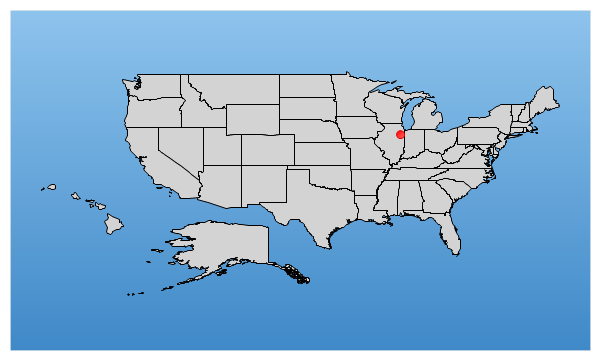
Add Map Point
<%@ Page Language="C#" Description="dotnetCHARTING Component" %>
<%@ Register TagPrefix="dotnet" Namespace="dotnetCHARTING" Assembly="dotnetCHARTING"%>
<%@ Import Namespace="System.Drawing" %>
<%@ Import Namespace="System.Drawing.Drawing2D" %>
<%@ Import Namespace="dotnetCHARTING.Mapping" %>
<script runat="server">
void Page_Load(Object sender,EventArgs e)
{
Chart.Type = ChartType.Map;//Horizontal;
Chart.Size = "600x350";
Chart.TempDirectory = "temp";
Chart.Debug = true;
//Chart.Title = ".netCHARTING Sample";
Chart.ChartArea.Background = new Background(Color.FromArgb(142,195,236),Color.FromArgb(63,137,200),90);
Chart.Mapping.DefaultShape.Background.Color = Color.LightGray;
// Demonstrates adding a point onto the map programatically.
// FullScreen
// Get the us states layer and add it.
MapLayer layer = MapDataEngine.LoadLayer( @"../../images/MapFiles/primusa.shp");
Chart.Mapping.MapLayerCollection.Add(layer);
// A new layer is required for adding points onto the chart.
MapLayer layer2 = new MapLayer();
// Add the point to the new layer.
layer2.AddLatLongPoint(new Point(41,-88),new ElementMarker(ElementMarkerType.Circle,8,Color.Red));
// Add the point layer to the chart.
Chart.Mapping.MapLayerCollection.Add(layer2);
}
</script>
<html xmlns="http://www.w3.org/1999/xhtml">
<head>
<title>.netCHARTING Sample</title> </head>
<body style="position: relative">
<div align="center">
<dotnet:Chart id="Chart" runat="server"/>
</div>
</body>
</html>
<%@ Page Language="vb" Description="dotnetCHARTING Component" %>
<%@ Register TagPrefix="dotnet" Namespace="dotnetCHARTING" Assembly="dotnetCHARTING"%>
<%@ Import Namespace="System.Drawing" %>
<%@ Import Namespace="System.Drawing.Drawing2D" %>
<%@ Import Namespace="dotnetCHARTING.Mapping" %>
<script runat="server">
Sub Page_Load(ByVal sender As Object, ByVal e As EventArgs)
Chart.Type = ChartType.Map 'Horizontal;
Chart.Size = "600x350"
Chart.TempDirectory = "temp"
Chart.Debug = True
'Chart.Title = ".netCHARTING Sample";
Chart.ChartArea.Background = New Background(Color.FromArgb(142,195,236),Color.FromArgb(63,137,200),90)
Chart.Mapping.DefaultShape.Background.Color = Color.LightGray
' Demonstrates adding a point onto the map programatically.
' FullScreen
' Get the us states layer and add it.
Dim layer As MapLayer = MapDataEngine.LoadLayer("../../images/MapFiles/primusa.shp")
Chart.Mapping.MapLayerCollection.Add(layer)
' A new layer is required for adding points onto the chart.
Dim layer2 As MapLayer = New MapLayer()
' Add the point to the new layer.
layer2.AddLatLongPoint(New Point(41,-88),New ElementMarker(ElementMarkerType.Circle,8,Color.Red))
' Add the point layer to the chart.
Chart.Mapping.MapLayerCollection.Add(layer2)
End Sub
</script>
<html xmlns="http://www.w3.org/1999/xhtml">
<head>
<title>.netCHARTING Sample</title> </head>
<body style="position: relative">
<div align="center">
<dotnet:Chart id="Chart" runat="server"/>
</div>
</body>
</html>
- Sample FilenameAddMapPoint.aspx
- Version4.1
- Uses DatabaseNo