Orders 3
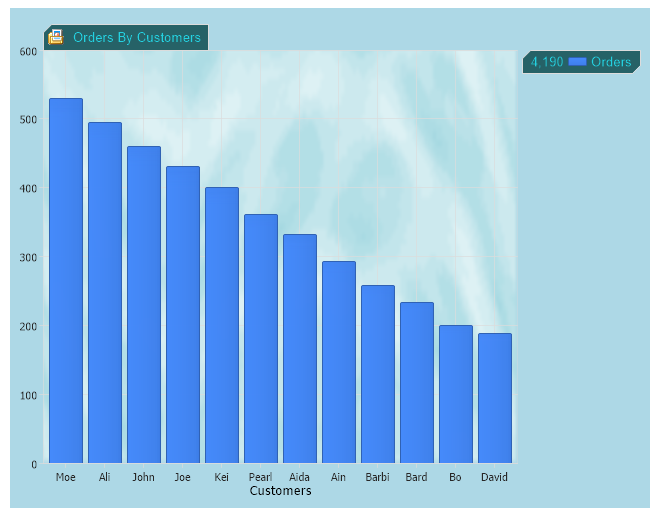
Orders report by customers with different background, font and size settings.
<%@ Page Language="C#" Description="dotnetCHARTING Component"%>
<%@ Register TagPrefix="dotnet" Namespace="dotnetCHARTING" Assembly="dotnetCHARTING"%>
<%@ Import Namespace="System.Drawing" %>
<script runat="server">
void Page_Load(Object sender,EventArgs e)
{
//set global properties
Chart.DefaultSeries.ConnectionString = ConfigurationManager.AppSettings["DNCConnectionString"];
Chart.XAxis.Label.Text="Customers";
Chart.TempDirectory="temp";
Chart.Debug=true;
Chart.ChartArea.Shadow.Depth=10;
Chart.TitleBox.IconPath="../../Images/icon.gif";
//you can set the size by 2 ways: using Size property or Height and Width properties.
//Chart.Size="500x640";
Chart.Height=500;
Chart.Width=640;
Chart.YAxis.Interval = 100;
//Chart.LegacyMode = true;
//set backgrounds
Chart.ChartArea.Background = new Background("../../Images/background.gif",BackgroundMode.ImageStretch);
Chart.Background = new Background(System.Drawing.Color.LightBlue);
Chart.TitleBox.Background = new Background(System.Drawing.Color.FromArgb(38,98,103));
Chart.LegendBox.Background = new Background(System.Drawing.Color.FromArgb(38,98,103));
Chart.TitleBox.Label = new dotnetCHARTING.Label("Orders By Customers",new Font("Arial",10),Color.FromArgb(36,209,224));
Chart.LegendBox.LabelStyle = new dotnetCHARTING.Label("",new Font("Arial",10),Color.FromArgb(36,209,224));
//Add a series
Chart.Series.Name="Orders";
Chart.Series.SqlStatement= @"SELECT Name,Sum(1) FROM Orders GROUP BY Name ORDER BY Sum(1) DESC";
Chart.SeriesCollection.Add();
}
</script>
<html xmlns="http://www.w3.org/1999/xhtml"><head><title>Orders Report</title></head>
<body>
<div style="text-align:center">
<dotnet:Chart id="Chart" runat="server"/>
</div>
</body>
</html>
<%@ Page Language="vb" Description="dotnetCHARTING Component"%>
<%@ Register TagPrefix="dotnet" Namespace="dotnetCHARTING" Assembly="dotnetCHARTING"%>
<%@ Import Namespace="System.Drawing" %>
<script runat="server">
Sub Page_Load(ByVal sender As Object, ByVal e As EventArgs)
'set global properties
Chart.DefaultSeries.ConnectionString = ConfigurationManager.AppSettings("DNCConnectionString")
Chart.XAxis.Label.Text="Customers"
Chart.TempDirectory="temp"
Chart.Debug=True
Chart.ChartArea.Shadow.Depth=10
Chart.TitleBox.IconPath="../../Images/icon.gif"
'you can set the size by 2 ways: using Size property or Height and Width properties.
'Chart.Size="500x640";
Chart.Height=500
Chart.Width=640
Chart.YAxis.Interval = 100
'Chart.LegacyMode = true;
'set backgrounds
Chart.ChartArea.Background = New Background("../../Images/background.gif",BackgroundMode.ImageStretch)
Chart.Background = New Background(System.Drawing.Color.LightBlue)
Chart.TitleBox.Background = New Background(System.Drawing.Color.FromArgb(38,98,103))
Chart.LegendBox.Background = New Background(System.Drawing.Color.FromArgb(38,98,103))
Chart.TitleBox.Label = New dotnetCHARTING.Label("Orders By Customers",New Font("Arial",10),Color.FromArgb(36,209,224))
Chart.LegendBox.LabelStyle = New dotnetCHARTING.Label("",New Font("Arial",10),Color.FromArgb(36,209,224))
'Add a series
Chart.Series.Name="Orders"
Chart.Series.SqlStatement= "SELECT Name,Sum(1) FROM Orders GROUP BY Name ORDER BY Sum(1) DESC"
Chart.SeriesCollection.Add()
End Sub
</script>
<html xmlns="http://www.w3.org/1999/xhtml"><head><title>Orders Report</title></head>
<body>
<div style="text-align:center">
<dotnet:Chart id="Chart" runat="server"/>
</div>
</body>
</html>

 Previous