Gallery
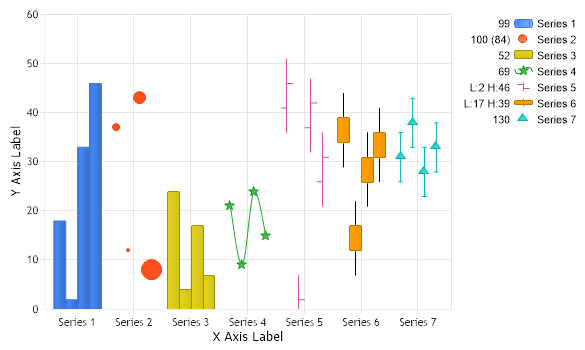
Column SBS
<%@ Page Language="C#" Description="dotnetCHARTING Component" %>
<%@ Register TagPrefix="dotnet" Namespace="dotnetCHARTING" Assembly="dotnetCHARTING"%>
<%@ Import Namespace="System.Drawing" %>
<html xmlns="http://www.w3.org/1999/xhtml">
<head>
<title>.netCHARTING Sample</title>
<script runat="server">
void Page_Load(Object sender,EventArgs e)
{
// Set the chart type
Chart.Type = ChartType.ComboSideBySide;
// Set the size
Chart.Width = 600;
Chart.Height = 350;
// Set the temp directory
Chart.TempDirectory = "temp";
// Debug mode. ( Will show generated errors if any )
Chart.Debug = true;
//Chart.Title = "My Chart";
// Axis Labels
Chart.XAxis.Label.Text = "X Axis Label";
Chart.YAxis.Label.Text = "Y Axis Label";
Chart.MaximumBubbleSize = 20;
Chart.YAxis.Minimum = 0;
// *DYNAMIC DATA NOTE*
// This sample uses random data to populate the chart. To populate
// a chart with database data see the following resources:
// - Classic samples folder
// - Help File > Data Tutorials
// - Sample: features/DataEngine.aspx
SeriesCollection mySC = getRandomData();
mySC[0].Type = SeriesType.Cylinder;
mySC[1].Type = SeriesType.Bubble;
mySC[2].Type = SeriesType.Bar;
mySC[3].Type = SeriesType.Spline;
mySC[4].Type = SeriesTypeFinancial.Bar;
mySC[5].Type = SeriesTypeFinancial.CandleStick;
mySC[6].Type = SeriesType.Marker;
mySC[6].DefaultElement.ErrorOffset = 5;
// Add the random data.
Chart.SeriesCollection.Add(mySC);
}
SeriesCollection getRandomData()
{
SeriesCollection SC = new SeriesCollection();
Random myR = new Random();
for(int a = 1; a < 8; a++)
{
Series s = new Series();
s.Name = "Series " + a;
for(int b = 1; b < 5; b++)
{
Element e = new Element();
e.Name = "Element " + b;
e.YValue = myR.Next(50);
e.BubbleSize = myR.Next(50);
e.Open = e.YValue - 5;
e.High = e.YValue + 5;
e.Low = e.YValue - 10;
e.Close =b%2==0?e.YValue-2:e.YValue+2;
s.Elements.Add(e);
}
SC.Add(s);
}
return SC;
}
</script>
</head>
<body>
<div style="text-align:center">
<dotnet:Chart id="Chart" runat="server"/>
</div>
</body>
</html>
<%@ Page Language="vb" Description="dotnetCHARTING Component" %>
<%@ Register TagPrefix="dotnet" Namespace="dotnetCHARTING" Assembly="dotnetCHARTING"%>
<%@ Import Namespace="System.Drawing" %>
<html xmlns="http://www.w3.org/1999/xhtml">
<head>
<title>.netCHARTING Sample</title>
<script runat="server">
Sub Page_Load(ByVal sender As Object, ByVal e As EventArgs)
' Set the chart type
Chart.Type = ChartType.ComboSideBySide
' Set the size
Chart.Width = 600
Chart.Height = 350
' Set the temp directory
Chart.TempDirectory = "temp"
' Debug mode. ( Will show generated errors if any )
Chart.Debug = True
'Chart.Title = "My Chart";
' Axis Labels
Chart.XAxis.Label.Text = "X Axis Label"
Chart.YAxis.Label.Text = "Y Axis Label"
Chart.MaximumBubbleSize = 20
Chart.YAxis.Minimum = 0
' *DYNAMIC DATA NOTE*
' This sample uses random data to populate the chart. To populate
' a chart with database data see the following resources:
' - Classic samples folder
' - Help File > Data Tutorials
' - Sample: features/DataEngine.aspx
Dim mySC As SeriesCollection = getRandomData()
mySC(0).Type = SeriesType.Cylinder
mySC(1).Type = SeriesType.Bubble
mySC(2).Type = SeriesType.Bar
mySC(3).Type = SeriesType.Spline
mySC(4).Type = SeriesTypeFinancial.Bar
mySC(5).Type = SeriesTypeFinancial.CandleStick
mySC(6).Type = SeriesType.Marker
mySC(6).DefaultElement.ErrorOffset = 5
' Add the random data.
Chart.SeriesCollection.Add(mySC)
End Sub
Function getRandomData() As SeriesCollection
Dim SC As SeriesCollection = New SeriesCollection()
Dim myR As Random = New Random()
For a As Integer = 1 To 7
Dim s As Series = New Series()
s.Name = "Series " & a
For b As Integer = 1 To 4
Dim e As Element = New Element()
e.Name = "Element " & b
e.YValue = myR.Next(50)
e.BubbleSize = myR.Next(50)
e.Open = e.YValue - 5
e.High = e.YValue + 5
e.Low = e.YValue - 10
If b Mod 2=0 Then
e.Close =e.YValue-2
Else
e.Close =e.YValue+2
End If
s.Elements.Add(e)
Next b
SC.Add(s)
Next a
Return SC
End Function
</script>
</head>
<body>
<div style="text-align:center">
<dotnet:Chart id="Chart" runat="server"/>
</div>
</body>
</html>
- Sample FilenameGallery/c09.aspx
- VersionLegacy (Pre 3.0)
- Uses DatabaseNo